Natour
← Back to chapters

Vibe Player

Milestone #1 - Requirements & Mockups

textpost · published

Attachments

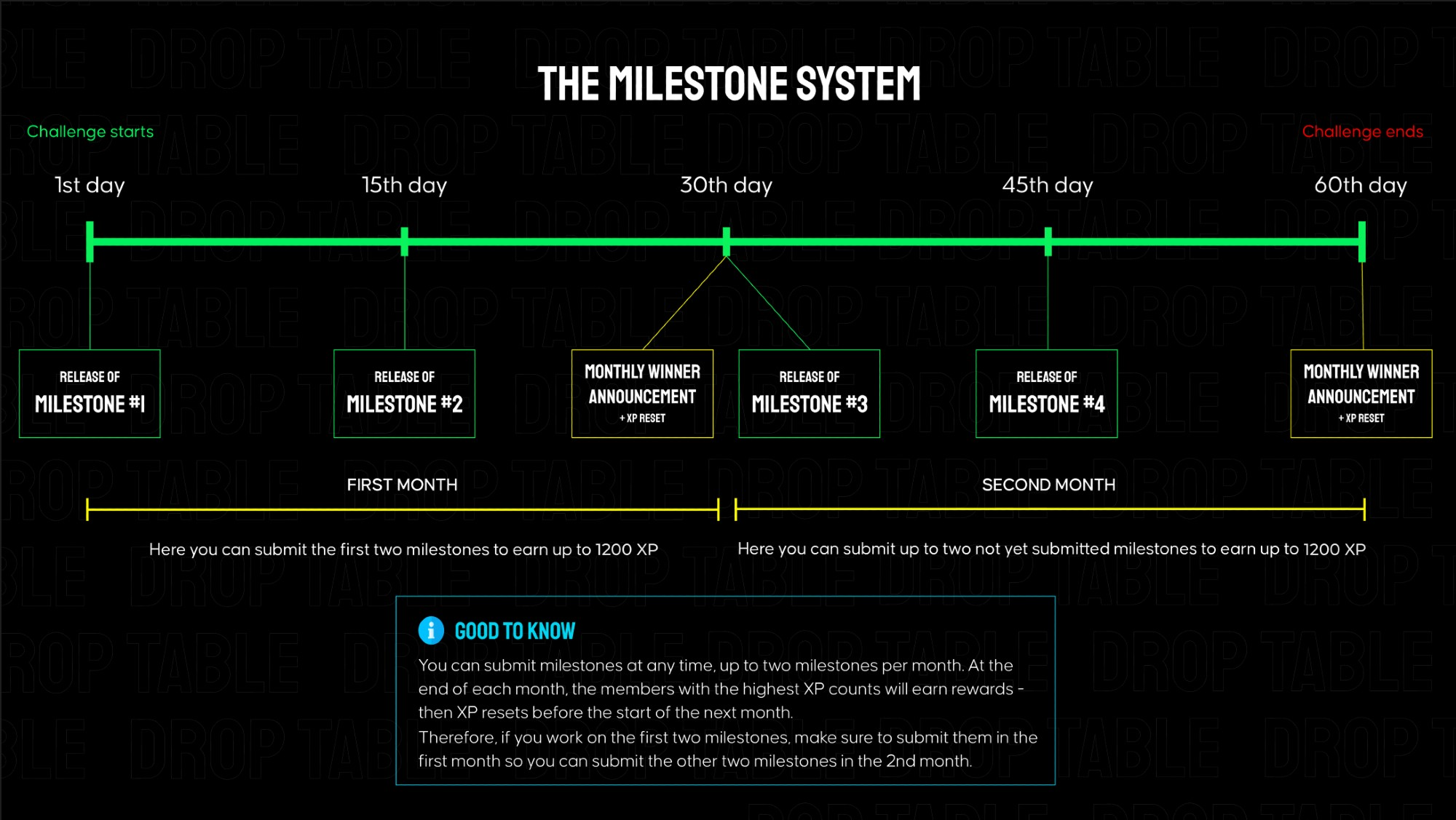
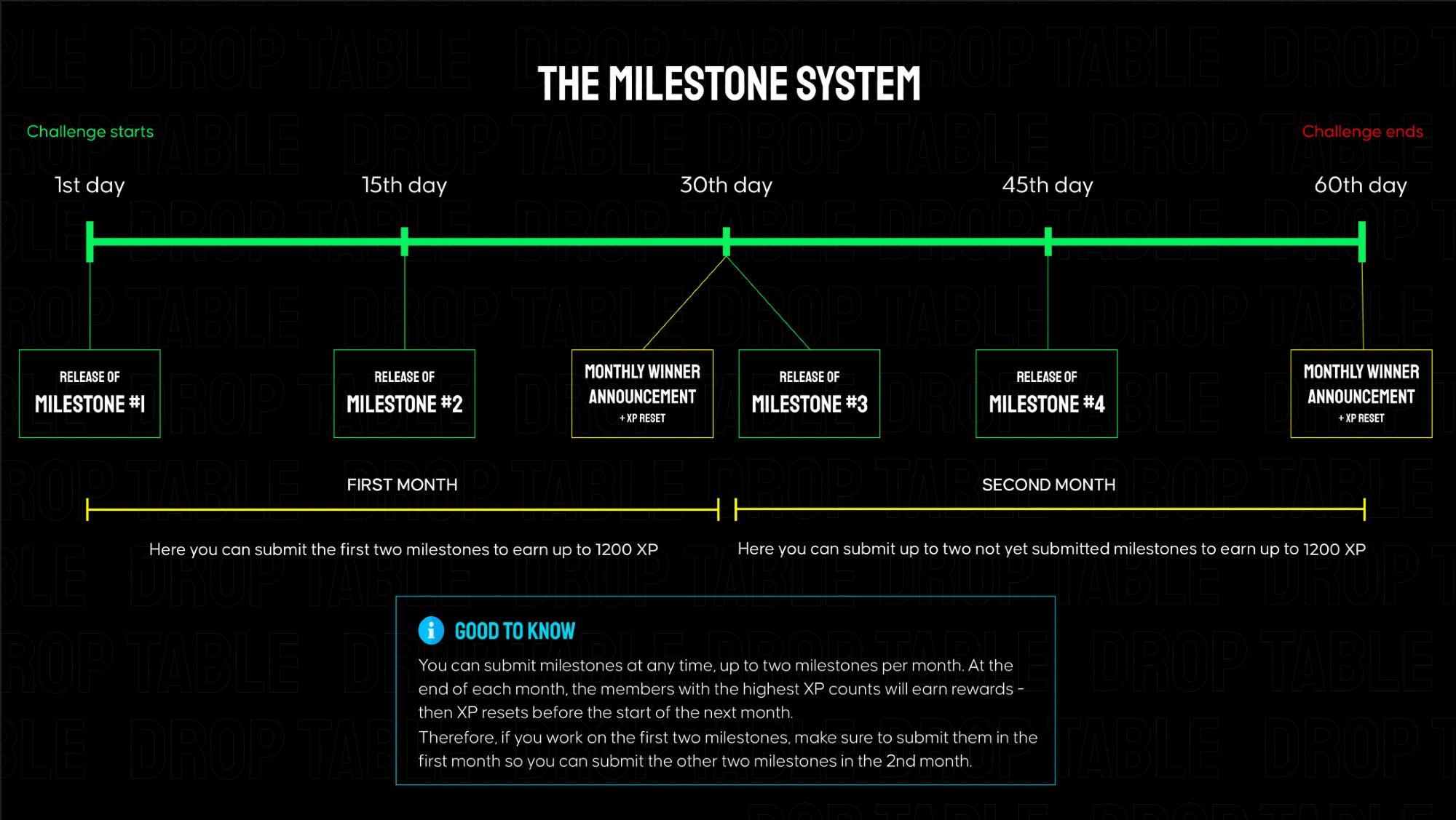
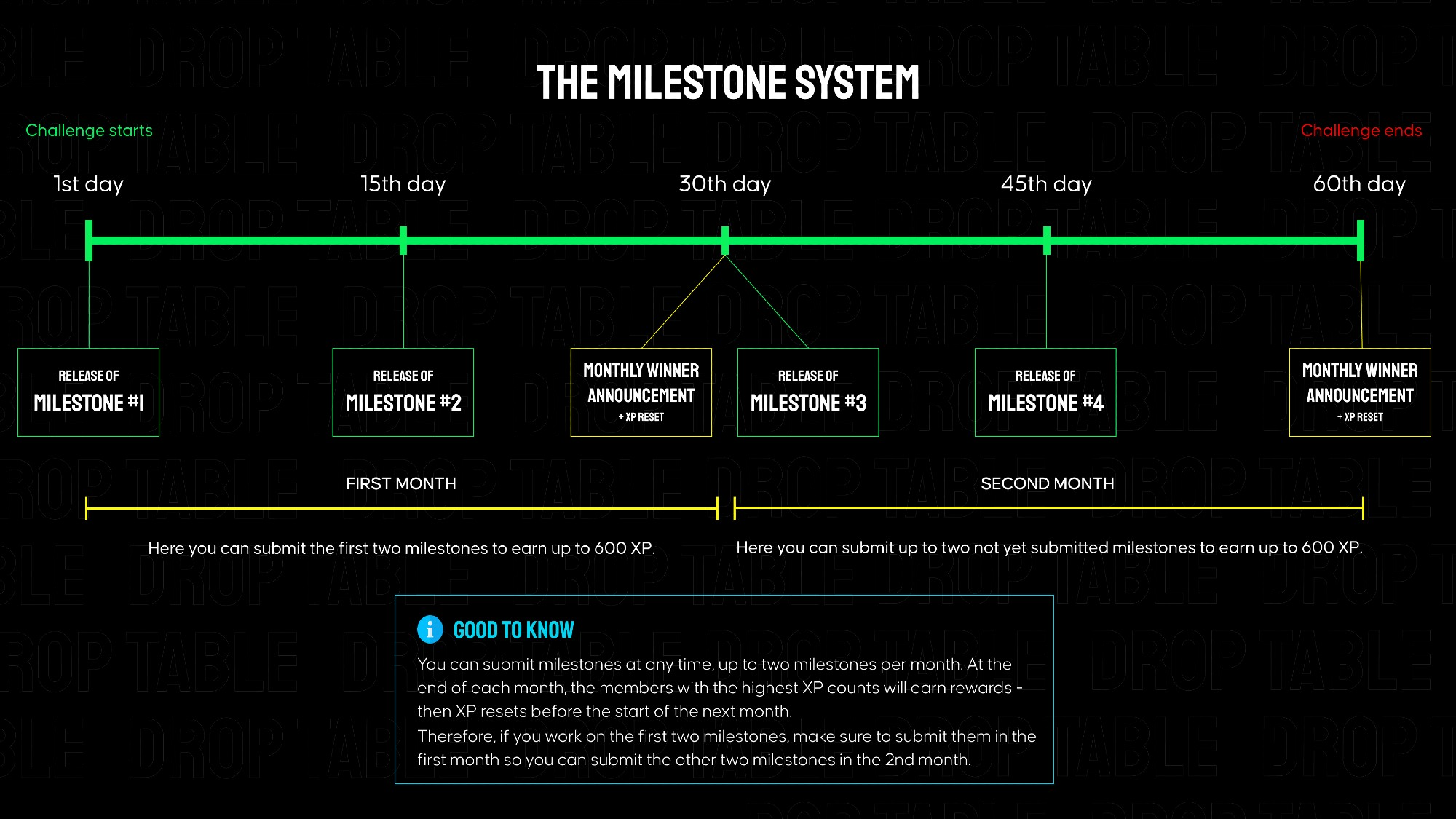
Vibe Player is separated into 4 milestones that build on each other, each granting 600 XP when submitted on Discord. Every ~2 weeks a new milestone is released here in the members area. The total challenge goes over 2 months.

👉 In the attachments, you can find links to the mockups and requirements for milestone #1.
Submission for Milestone #1:

A valid submission consists of a screen recording showcasing your app's functionality (must match the instructions below) as well as a link to your public GitHub repository.

Instructions for the milestone #1 video for Vibe Player - no longer than 90s:

  1. Open the app → show the Splash Screen.

  2. The Permission Screen appears — tap Allow Access to grant permission.

  3. The app opens the Main Screen → the Scanning State animation is visible.

  4. Wait until the scan finishes → show the Track List State.

  5. Scroll through the list → the scroll-to-top FAB appears.

  6. Tap the FAB → list scrolls back to the top.

  7. Open the Scan Music Screen using the scan icon.

  8. Select “Ignore duration < 30 s” and “Ignore size < 100 KB.”

  9. Press Scan → show radar rotation and progress indicator.

  10. After scan completes, observe SnackBar message and return to the Main Screen.

  11. Tap any song → open the Now Playing Screen.

  12. Verify album art, title, and artist are displayed.

  13. Press Play, then Next and Previous to test controls.

  14. Tap the Back arrow → verify playback stops and return to the Main Screen.

Make sure all behavior and visuals match the official mockups.

📂 In the attached files you will find images of all products that should be used in this challenge.
Milestone #2 - Requirements & Mockups

textpost · published

Attachments

Vibe Player is separated into 4 milestones that build on each other, each granting 600 XP when submitted on Discord. Every ~2 weeks a new milestone is released here in the members area. The total challenge goes over 2 months.

👉 In the attachments, you can find links to the mockups and requirements for milestone #2.

Submission for Milestone #2:

A valid submission consists of a screen recording showcasing your app's functionality (must match the instructions below) as well as a link to your public GitHub repository.

Instructions for the milestone #2 video for Vibe Player - no longer than 90s:

  1. Open the app → show the Main Screen.

  2. Tap the Search icon beside Scan.

  3. In the search field, type the beginning of any song title from your library → show that results appear in real time.

  4. Tap X to clear the field and Cancel to return to the Main Screen.

  5. Press Shuffle → Now Playing screen opens and music starts in random order.

  6. Tap Minimize (↓) → return to the Main Screen; Mini Player appears at the bottom.

  7. Tap the Mini Player → expand back to Now Playing.

  8. Activate Repeat One, then drag the seekbar near the end of the track → verify that the same song restarts automatically.

  9. Enable Shuffle, then skip to the next song → confirm that the order is random.

  10. Press Next (⏭) and Previous (⏮) to verify track navigation.

  11. Tap Minimize (↓) again → return to Main Screen with Mini Player still playing.

  12. Tap the Play/Pause button and then Next (⏭) on the Mini Player → confirm both work correctly and playback updates.

📂 In the attached files you will find images of all products that should be used in this challenge.

Milestone #3 - Requirements & Mockups

textpost · published

Attachments

VIbe Player is separated into 4 milestones that build on each other, each granting 600 XP when submitted on Discord. Every ~2 weeks a new milestone is released here in the members area. The total challenge goes over 2 months.

👉 In the attachments, you can find links to the mockups and requirements for milestone #3.

Submission for Milestone #3:

A valid submission consists of a screen recording showcasing your app's functionality (must match the instructions below) as well as a link to your public GitHub repository.

Instructions for the milestone #3 video for Vibe Player - no longer than 90s:

  1. Open the app → go to the Playlist tab.

  2. Tap the “+ Create playlist” button at the bottom.

  3. In the Create New Playlist bottom sheet, type a name longer than 40 characters → verify that extra input is not accepted.

  4. Enter a valid name (e.g., “My Playlist”) → tap Create.

  5. On the Add Songs screen, scroll the list and show that Search and Select All stay fixed at the top.

  6. Type part of any song or artist name in the search field → verify that results appear in real time.

  7. Tap X to clear the query → confirm that the full list reappears.

  8. Tap Select All → show that all songs are selected.

  9. Tap Select All again to deselect all songs → then manually select a few random songs from the list.

  10. Tap OK to confirm selection → the app returns to the Playlist tab.

  11. Show the newly created playlist with its title, correct song count, and updated placeholder or album art.

  12. Tap the + icon in the top-right corner → open the creation sheet again, enter a name, and tap Cancel.

Make sure all behavior and visuals match the official mockups.

📂 In the attached files you will find images of all products that should be used in this challenge.

Milestone #4 - Requirements & Mockups

textpost · published

Attachments

Vibe Player is separated into 4 milestones that build on each other, each granting 600 XP when submitted on Discord. Every ~2 weeks a new milestone is released here in the members area. The total challenge goes over 2 months.

👉 In the attachments, you can find links to the mockups and requirements for milestone #4.

Submission for Milestone #4:

A valid submission consists of a screen recording showcasing your app's functionality (must match the instructions below) as well as a link to your public GitHub repository.

Instructions for the milestone #4 video for Vibe Player - no longer than 90s:

  1. Open the app → go to the Now Playing screen.

  2. Tap the Add to Favourites icon (heart) → show that it fills in.

  3. Tap it again → confirm that the song is removed from Favourites.

  4. Tap the Add to Playlist icon (left of the heart).

  5. Tap + Create Playlist → enter a name and press Create.

  6. Show that a SnackBar appears: “Added to playlist [Playlist Name]”.

  7. Open the Playlist tab → tap the three dots (⋮) next to any playlist.

  8. In the Playlist Options sheet, tap Rename → change the name and press Rename.

  9. Reopen the same playlist menu → tap Change Cover, select an image from the gallery, and show that the new cover appears.

  10. Open the same menu again → tap Delete, confirm the deletion, and show that the playlist disappears.

  11. Tap the three dots next to Favourites → verify that only Play is available.

  12. Tap Play → the Now Playing screen opens with songs from Favourites.

  13. Return to the Playlist tab → tap the + icon → create a new empty playlist without adding songs and open it.

  14. Show the Empty Playlist State with the message “No Songs Found” → tap Add Songs and verify that the Add Songs screen opens.

  15. Open any playlist that already contains songs → show the Playlist Playback Screen displaying the cover art, playlist name, and full list of tracks.

Make sure all behavior and visuals match the official mockups.

📂 In the attached files you will find images of all products that should be used in this challenge.