Natour
← Back to chapters

ScribbleDash

Milestone #1 - Requirements & Mockups

textpost · published

Attachments

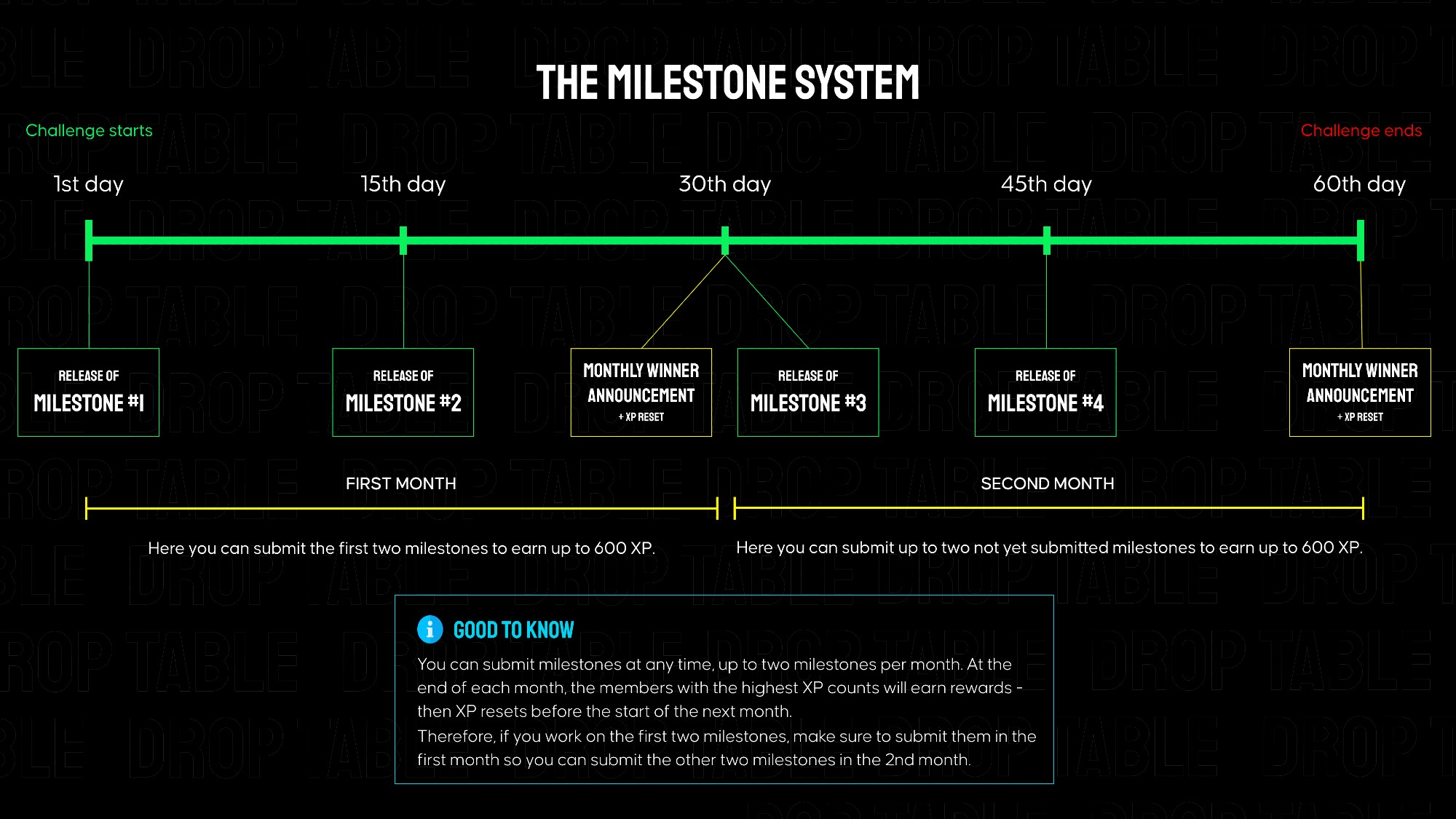
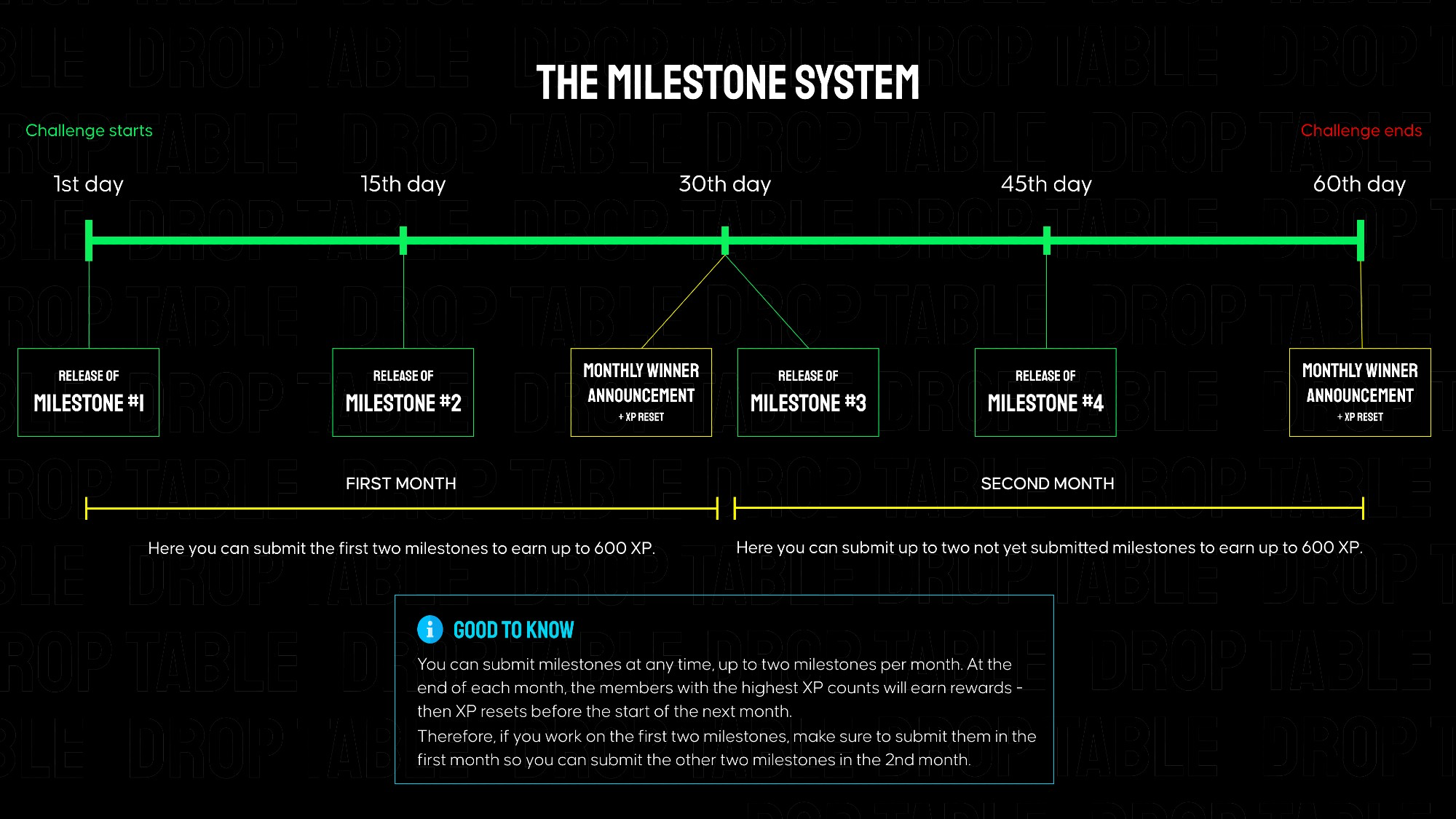
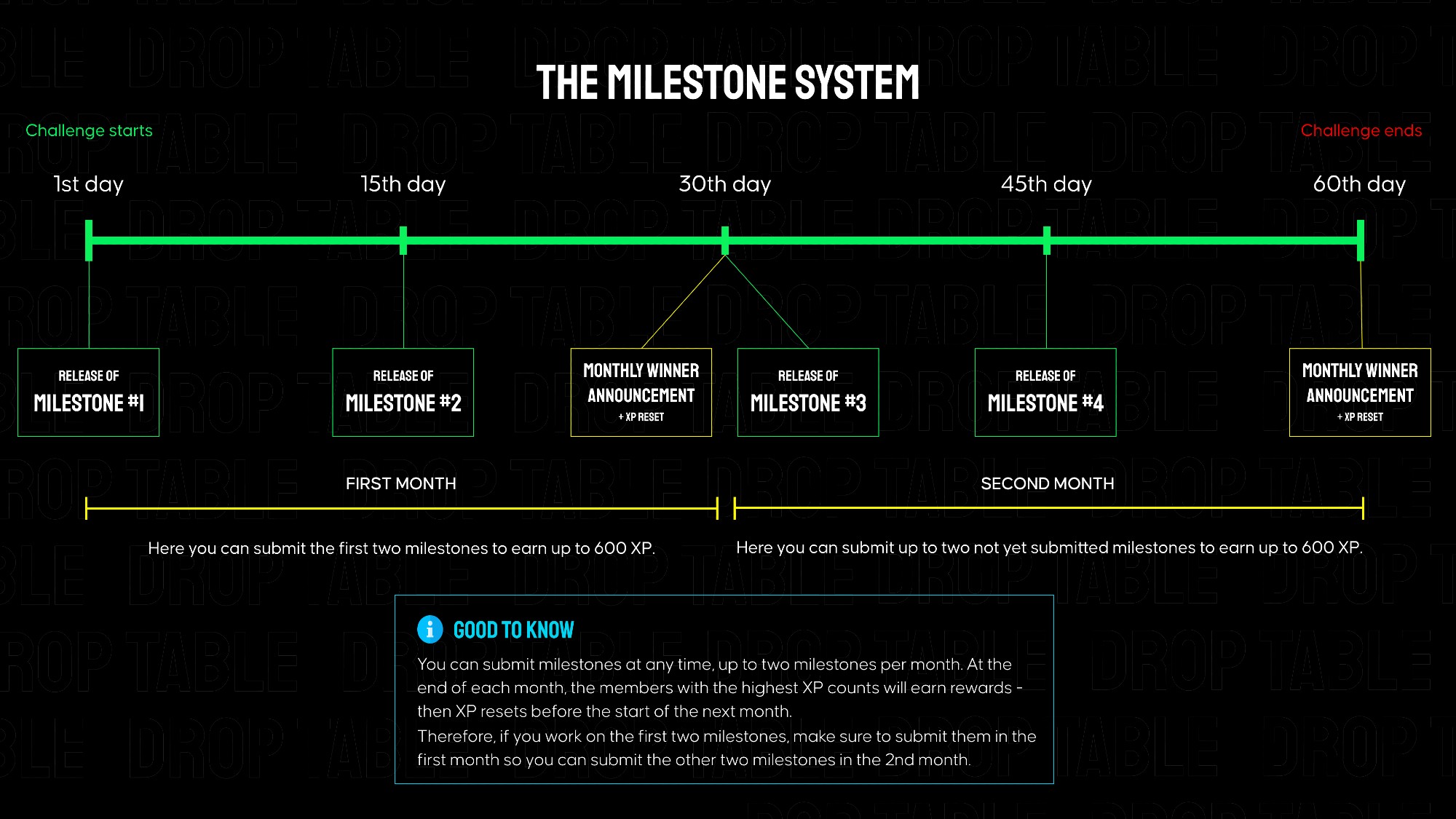
ScribbleDash is separated into 4 milestones that build on each other, each granting 300 XP when submitted on Discord. Every ~2 weeks a new milestone is released here in the members area. The total challenge goes over 2 months.

👉 In the attachments on the right, you can find links to the mockups and requirements for milestone #1.
Submission for Milestone #1:

A valid submission consists of a screen recording showcasing your app's functionality (must match the instructions below) as well as a link to your public GitHub repository.

Instructions for the milestone #1 video for ScribbleDash - no longer than 40s:

  1. Open the app and click on "One Round Wonder".

  2. Select "Challenging" difficulty.

  3. Draw two triangles, each consisting of one path.

  4. Click on "Undo" once.

  5. Click on "Redo" once.

  6. Click on "Clear Canvas".

Milestone #2 - Requirements & Mockups

textpost · published

Attachments

ScribbleDash is separated into 4 milestones that build on each other, each granting 300 XP when submitted on Discord. Every ~2 weeks a new milestone is released here in the members area. The total challenge goes over 2 months.

👉 In the attachments on the right, you can find links to the mockups and requirements for milestone #2.

Submission for Milestone #2:

A valid submission consists of a screen recording showcasing your app's functionality (must match the instructions below) as well as a link to your public GitHub repository.

Use the new /submit-challenge command to submit the challenge 🙂

Instructions for the milestone #2 video for ScribbleDash - no longer than 40s:

  1. Open the app and click on the Statistics bottom navigation destination

  2. Tap on the Home bottom navigation destination

  3. Tap on "One Round Wonder".

  4. Select "Beginner" difficulty.

  5. Try to draw the image presented to you.

  6. Tap "Done"

  7. Tap "Try Again"

  8. After being shown the new image, draw a single straight line

  9. Tap "Done"

Milestone #3 - Requirements & Mockups

textpost · published

Attachments

ScribbleDash is separated into 4 milestones that build on each other, each granting 300 XP when submitted on Discord. Every ~2 weeks a new milestone is released here in the members area. The total challenge goes over 2 months.

👉🏼In the attachments on the right, you can find links to the mockups and requirements for milestone #3.

Submission for Milestone #3:

A valid submission consists of a screen recording showcasing your app's functionality (must match the instructions below) as well as a link to your public GitHub repository.

Use the new /submit-challenge command to submit the challenge 🙂

Instructions for the milestone #3 video for ScribbleDash - no longer than 90s:

Note: Please ensure that there are no high scores when you start recording

  1. Open the app and click on the Statistics bottom navigation destination

  2. Tap on the Home bottom navigation destination

  3. Tap on "Speed Draw".

  4. Choose any difficulty

  5. Play this round until your counter reaches one (1). One of your drawings must be low-accuracy so that it does not increment the counter.

  6. Tap the close icon at the top right corner to exit the game mode.

  7. When back on the Home screen, tap the "Endless Mode" game and choose the Beginner difficulty

  8. Get your first drawing to pass the criteria for the game mode so that the counter increases and you land on the "Passed" results screen

  9. Tap "Next Drawing"

  10. Draw a straight line to ensure the accuracy is low

  11. Tap "Finish"

  12. On the final results screen (it should show that you got a high score), tap the close icon

  13. Go to the Statistics screen to show the updated high score

Milestone #4 - Requirements & Mockups

textpost · published

Attachments

ScribbleDash is separated into 4 milestones that build on each other, each granting 300 XP when submitted on Discord. Every ~2 weeks a new milestone is released here in the members area. The total challenge goes over 2 months.

This is the final milestone for ScribbleDash 🎉

👉🏼In the attachments on the right, you can find links to the mockups and requirements for milestone #4.

Submission for Milestone #4:

A valid submission consists of a screen recording showcasing your app's functionality (must match the instructions below) as well as a link to your public GitHub repository.

Use the new /submit-challenge command to submit the challenge 🙂

Instructions for the milestone #4 video for ScribbleDash - no longer than 90s:

Note: Please ensure you've enough coins to make a few purchases for this video.

  1. Land on the home page

  2. Start and complete a "One Round Wonder" game mode on Challenging difficulty.

  3. Navigate to the shop screen

  4. Purchase a new pen color and a new canvas background

  5. Return to the home screen

  6. Complete a round of "Endless Mode" on Beginner difficulty (please only show max two drawings 🙂)