Natour
← Back to chapters

March 2026 - Spring Validation

[Easy] [Unit Testing · ViewModel · Validation] - New Chapter Check-in

textpost · published

Attachments

🎭 Scenario

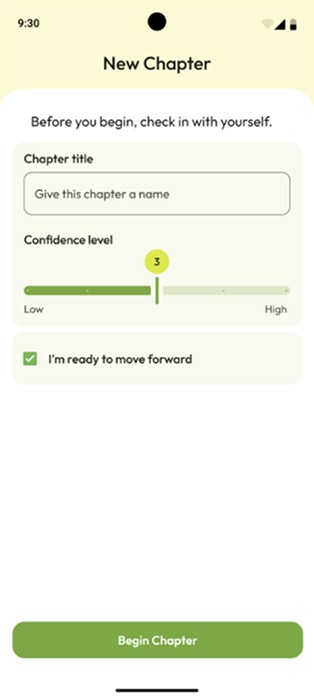
Sometimes, before starting a new phase - in learning, work, or life in general - it’s helpful to pause for a moment and honestly ask yourself: am I really ready to move forward? This screen represents a short check-in before beginning a new chapter: giving it a name, sensing your level of confidence, and consciously confirming your intention. Only after that does the app allow the next step to begin.

You can find the technical requirements and the GitHub repository link in the attachments section ☝️

🔗 Useful Links for This Challenge

🤔 What's Allowed?

  • Standard Android / Jetpack libraries.

  • Writing unit tests for ViewModel.

⚠️ What's not important

  • UI implementation details or Compose-related behavior.

  • Navigation or screen interaction logic.

  • Refactoring the existing ViewModel structure.

  • Adding extra validation rules beyond those specified.

  • Writing additional tests that are not explicitly required.


🏆 Submission & Rewards

  • A successful submission of this challenge via the /submit-challenge command on Discord grants you 100 XP. You can use it in any channel on Discord :)

  • A successful submission consists of these parts

    1. A link to a Gist with your implementation

    2. A screenshot of the test run results showing

      • which tests passed,

      • which tests failed,

      • and the names of the executed tests.

Note:
Some tests in this challenge are expected to fail due to intentionally incorrect behavior in the app implementation. Your goal is to write correct tests, not to make all tests pass.

📩 How to Submit a Mini-Challenge

  • In any Discord channel, type /submit-challenge.

  • Attach your screen recording demonstrating the implementation according to the challenge requirements.

  • Supported formats: MP4, MOV, AVI, MKV, WEBM, PNG, JPEG, JPG, GIF.

  • The total file size must not exceed 50 MB.

  • If additional materials are required (e.g. screenshots), attach up to 4 additional image files in the command pop-up before submitting.

  • Press Enter to send the files.

  • In the bot flow, select Mini-Challenge.

  • Choose the month this mini-challenge belongs to (each month includes five mini-challenges).

  • Select the exact challenge name you are submitting.

  • Submit challenge.

[Easy] [UI Testing · Toggle Interaction · State Transitions] - Season Status Indicator

textpost · published

Attachments

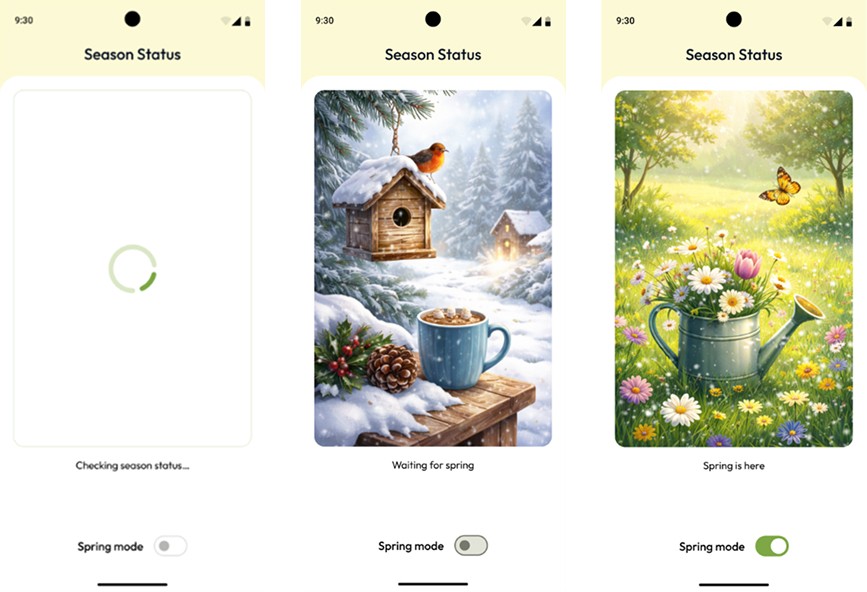
🎭 Scenario

Imagine an app that shows the user the current “state of the world” - for example, the current season. At first, the app doesn’t know anything and stays in a loading state, then it receives a system-defined state, and later allows the user to change it manually. In real projects, screens like this often break: the UI doesn’t update in time or shows the wrong state. In this challenge, your task is to write tests that verify the UI always reflects the current state correctly.

You can find the technical requirements and the GitHub repository link in the attachments section ☝️


🔗 Useful Links for This Challenge

🤔 What's Allowed?

  • Standard Android / Jetpack libraries.

  • Any testing approach that verifies validation logic.

⚠️ What's not important

  • Writing additional tests beyond those specified in the requirements.

  • Covering extra edge cases not mentioned in the challenge.


🏆 Submission & Rewards

  • A successful submission of this challenge via the /submit-challenge command on Discord grants you 100 XP. You can use it in any channel on Discord :)

  • A successful submission consists of these parts

    1. A link to a Gist with your implementation

    2. A screenshot of the test run results showing

      • which tests passed,

      • which tests failed,

      • and the names of the executed tests.

Note:
Some tests in this challenge are expected to fail due to intentionally incorrect behavior in the app implementation. Your goal is to write correct tests, not to make all tests pass.

📩 How to Submit a Mini-Challenge

  • In any Discord channel, type /submit-challenge.

  • Attach your screen recording demonstrating the implementation according to the challenge requirements.

  • Supported formats: MP4, MOV, AVI, MKV, WEBM, PNG, JPEG, JPG, GIF.

  • The total file size must not exceed 50 MB.

  • If additional materials are required (e.g. screenshots), attach up to 4 additional image files in the command pop-up before submitting.

  • Press Enter to send the files.

  • In the bot flow, select Mini-Challenge.

  • Choose the month this mini-challenge belongs to (each month includes five mini-challenges).

  • Select the exact challenge name you are submitting.

  • Submit challenge.

[Easy] [Unit Testing · ViewModel · Persistence] - Fresh Start Draft

textpost · published

Attachments

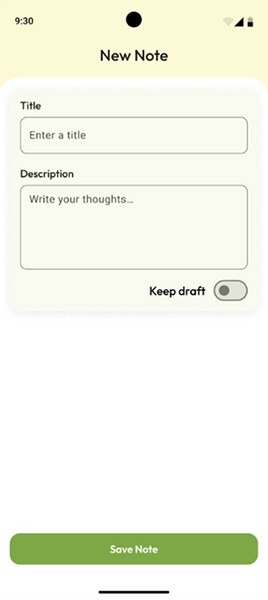
🎭 Scenario

The app includes a simple screen for creating a new note. The user opens it and starts typing an idea, a reminder, or a quick thought. A Keep draft toggle allows the user to decide whether this draft should be preserved if the app is closed and opened again. In this challenge, the key goal is to make sure the app behaves predictably: the draft is either restored or cleared, exactly as the user expects.

You can find the technical requirements and the GitHub repository link in the attachments section ☝️


🔗  Useful Links for This Challenge

🤔 What's Allowed?

  • Standard Android / Jetpack libraries.

  • Writing unit tests for ViewModel or domain logic.

⚠️ What's not important

  • UI testing or UI implementation details.

  • How the draft is visually displayed on the screen.

  • Writing additional tests beyond those specified in the requirements.

  • Covering extra edge cases not mentioned in the challenge.


🏆 Submission & Rewards

  • A successful submission of this challenge via the /submit-challenge command on Discord grants you 100 XP. You can use it in any channel on Discord :)

  • A successful submission consists of these parts

    1. A link to a Gist with your implementation

    2. A screenshot of the test run results showing

      • which tests passed,

      • which tests failed,

      • and the names of the executed tests.

Note:
Some tests in this challenge are expected to fail due to intentionally incorrect behavior in the app implementation. Your goal is to write correct tests, not to make all tests pass.

📩 How to Submit a Mini-Challenge

  • In any Discord channel, type /submit-challenge.

  • Attach your screen recording demonstrating the implementation according to the challenge requirements.

  • Supported formats: MP4, MOV, AVI, MKV, WEBM, PNG, JPEG, JPG, GIF.

  • The total file size must not exceed 50 MB.

  • If additional materials are required (e.g. screenshots), attach up to 4 additional image files in the command pop-up before submitting.

  • Press Enter to send the files.

  • In the bot flow, select Mini-Challenge.

  • Choose the month this mini-challenge belongs to (each month includes five mini-challenges).

  • Select the exact challenge name you are submitting.

  • Submit challenge.

[Medium] [UI Testing · Unit Testing · Navigation · Lifecycle] - A New Morning

textpost · published

Attachments

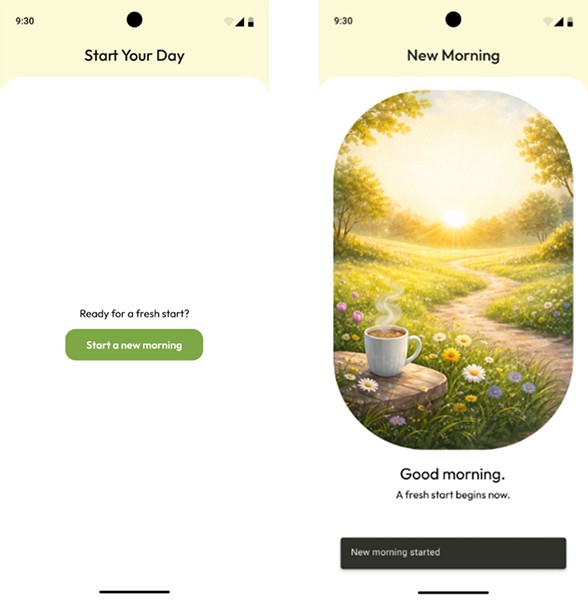
🎭 Scenario

Imagine a small app that helps you start your day with a clean slate. You open it in the morning, tap a single button, and that’s it - yesterday is gone, today begins. No extra steps, no way back, just a fresh start and a short confirmation that everything worked as expected. This challenge focuses on making sure that this simple flow behaves consistently, even when the app is recreated or restarted.

You can find the technical requirements and the GitHub repository link in the attachments section ☝️


🔗 Useful Links for This Challenge

🤔 What's Allowed?

  • Standard Android / Jetpack libraries.

  • Any testing approach that verifies validation logic.

⚠️ What's not important

  • Writing additional tests beyond those specified in the requirements.

  • Covering extra edge cases not mentioned in the challenge.


🏆 Submission & Rewards

  • A successful submission of this challenge via the /submit-challenge command on Discord grants you 200 XP. You can use it in any channel on Discord :)

  • A successful submission consists of these parts

    1. A link to a Gist with your implementation

    2. A screenshot of the test run results showing

      • which tests passed,

      • which tests failed,

      • and the names of the executed tests.

Note:
Some tests in this challenge are expected to fail due to intentionally incorrect behavior in the app implementation. Your goal is to write correct tests, not to make all tests pass.

📩 How to Submit a Mini-Challenge

  • In any Discord channel, type /submit-challenge.

  • Attach your screen recording demonstrating the implementation according to the challenge requirements.

  • Supported formats: MP4, MOV, AVI, MKV, WEBM, PNG, JPEG, JPG, GIF.

  • The total file size must not exceed 50 MB.

  • If additional materials are required (e.g. screenshots), attach up to 4 additional image files in the command pop-up before submitting.

  • Press Enter to send the files.

  • In the bot flow, select Mini-Challenge.

  • Choose the month this mini-challenge belongs to (each month includes five mini-challenges).

  • Select the exact challenge name you are submitting.

  • Submit challenge.

[Hard] [UI Testing · Unit Testing · Permissions · State Restoration] - First Spring Moment

textpost · published

Attachments

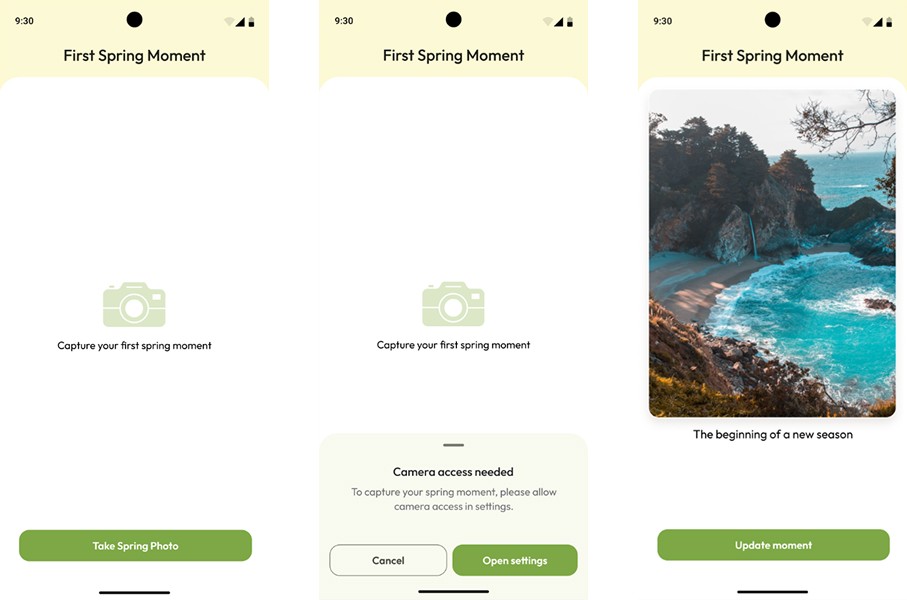
🎭 Scenario

The app lets the user capture their very first spring moment with a photo. Sounds simple - until permissions get involved. The user may allow camera access, deny it, deny it permanently, leave the app, come back later, or try again. This challenge is about making sure the app reacts correctly to every step: nothing happens without user intent, permissions are respected, and previously captured moments are not forgotten.

You can find the technical requirements and the GitHub repository link in the attachments section ☝️


🔗 Useful Links for This Challenge

🤔 What's Allowed?

  • Standard Android / Jetpack libraries.

  • Instrumentation tests for permission-driven flows.

  • Using fakes or stubs for camera-related side effects.

  • Any testing approach that verifies permission handling and state restoration logic.

⚠️ What's not important

  • Testing the real camera or photo capture behavior.

  • Verifying the visual appearance of system permission dialogs.

  • Covering additional edge cases beyond those described in the requirements.


🏆 Submission & Rewards

  • A successful submission of this challenge via the /submit-challenge command on Discord grants you 300 XP. You can use it in any channel on Discord :)

  • A successful submission consists of these parts

    1. A link to a Gist with your implementation

    2. A screenshot of the test run results showing

      • which tests passed,

      • which tests failed,

      • and the names of the executed tests.

Note:
Some tests in this challenge are expected to fail due to intentionally incorrect behavior in the app implementation. Your goal is to write correct tests, not to make all tests pass.

📩 How to Submit a Mini-Challenge

  • In any Discord channel, type /submit-challenge.

  • Attach your screen recording demonstrating the implementation according to the challenge requirements.

  • Supported formats: MP4, MOV, AVI, MKV, WEBM, PNG, JPEG, JPG, GIF.

  • The total file size must not exceed 50 MB.

  • If additional materials are required (e.g. screenshots), attach up to 4 additional image files in the command pop-up before submitting.

  • Press Enter to send the files.

  • In the bot flow, select Mini-Challenge.

  • Choose the month this mini-challenge belongs to (each month includes five mini-challenges).

  • Select the exact challenge name you are submitting.

  • Submit challenge.