Natour
← Back to chapters

January 2026 - New Year Fresh Start

[Image Loading · Navigation · State Management · UI] - Winter Travel Gallery

textpost · published

Attachments

🎭 Scenario

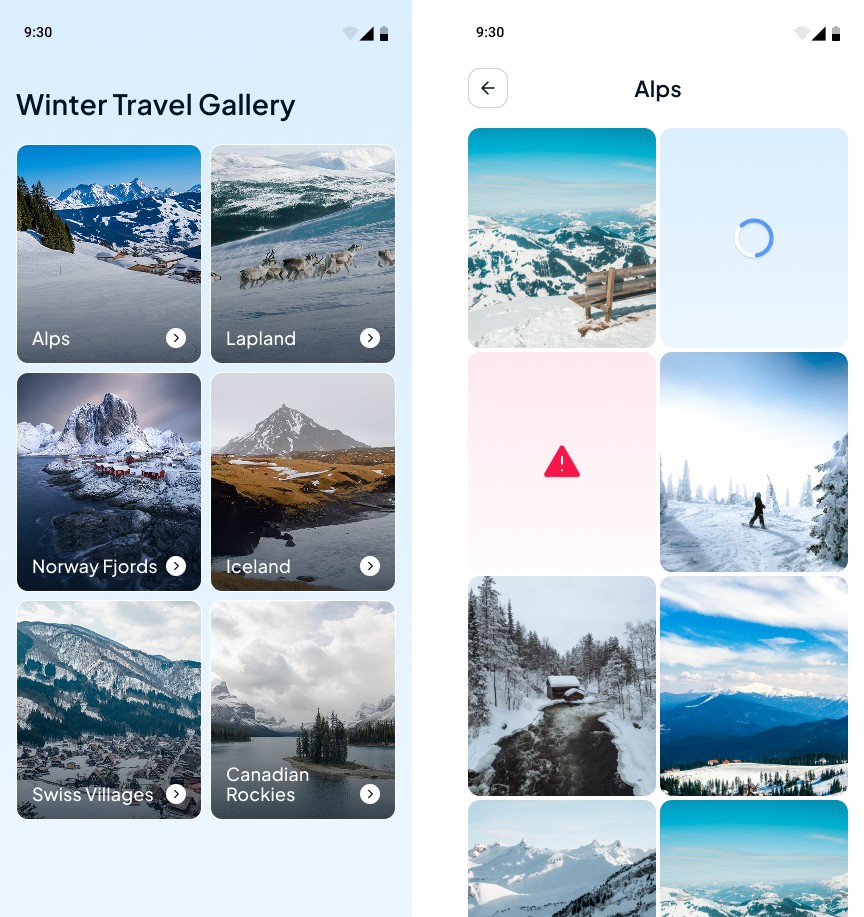
This mini app represents a simple winter travel browsing experience. The user explores a list of winter destinations and opens a photo gallery for each selected location. The gallery demonstrates image loading, error handling, caching behavior, and basic navigation between screens.

You can find the technical requirements, destination images and mockups in the attachments section ☝️

🔤 Font - Plus Jakarta Sans

🔗 Useful Links for This Challenge

🤔 What's Allowed?

  • Standard Android/Jetpack libraries

  • Any image loading solution.

  • Using Coil as a recommended (but not mandatory) approach for image loading and caching.

⚠️ What's not important

  • Responsiveness across every device size or orientation is not mandatory.

  • Light / Dark mode.

  • State persistence after app restart.

  • Animations or advanced visual effects.


🏆 Submission & Rewards

  • A successful submission of this challenge via the /submit-challenge command on Discord grants you 100 XP. You can use it in any channel on Discord :)

  • A successful submission consists of these parts

    1. A link to a Gist with your implementation

    2. A screen recording (max 20 seconds) showing:

      • Launching the app and displaying the main destinations screen.

      • Opening a gallery for any destination.

      • Scrolling through the gallery content.

      • Image loading behavior on first open.

      • Reopening the same gallery to demonstrate cached image loading.

      • Disabling the internet connection and opening a gallery to demonstrate the no-internet state.
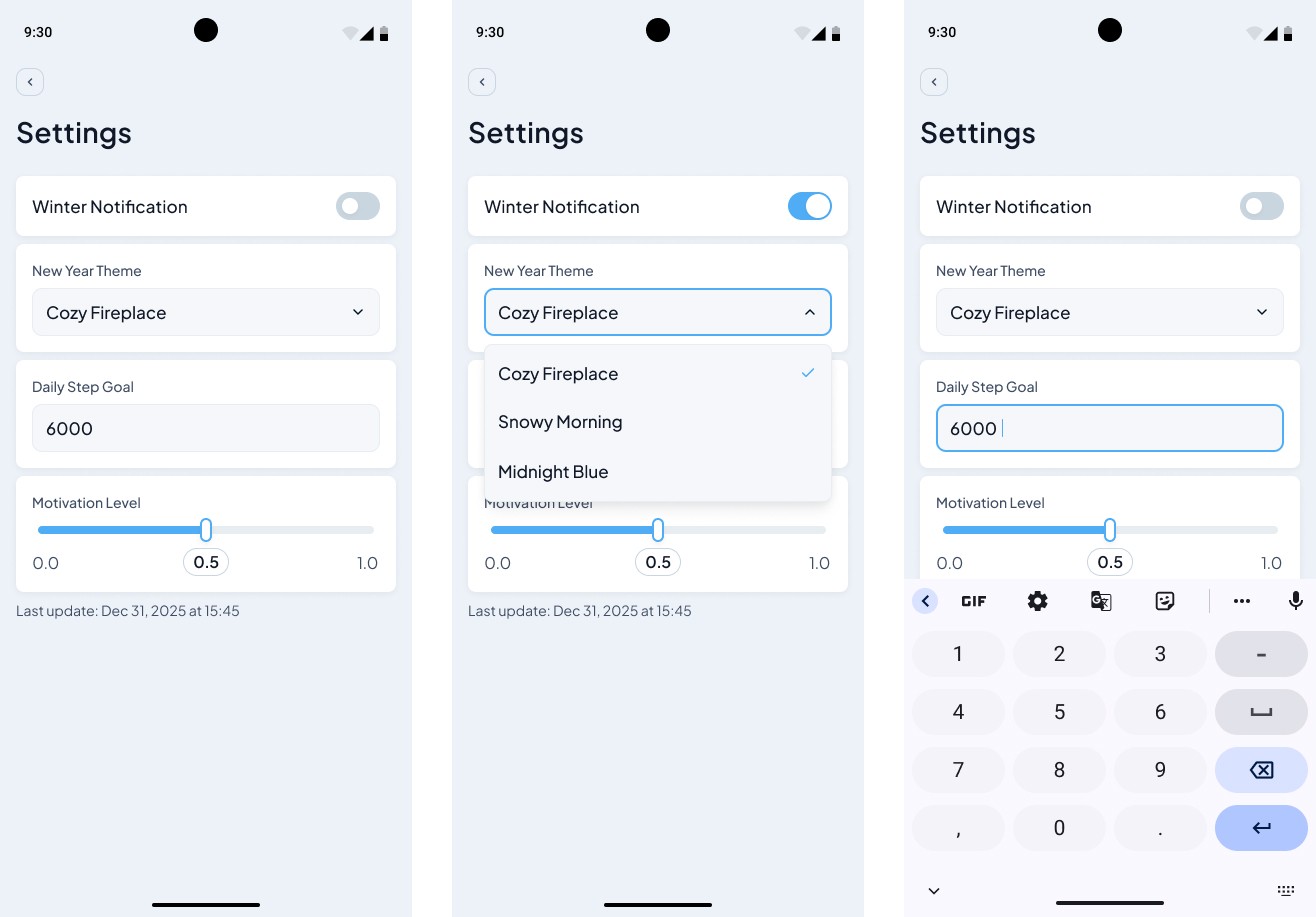
[DataStore · Forms · State Management · UI] – Fresh Start Settings

textpost · published

Attachments

🎭 Scenario

This mini-challenge simulates a simple New Year–themed settings screen where the user adjusts personal preferences. The screen represents a typical settings page and focuses on persisting user-defined values and restoring them correctly after app restarts.

You can find the technical requirements and mockups in the attachments section ☝️


🔤 Font - Plus Jakarta Sans

🔗 Useful Links for This Challenge

🤔 What's Allowed?

  • Standard Android / Jetpack libraries.

  • No 3rd party libraries are allowed or would be required to complete this challenge.

  • DataStore Preferences.

⚠️ What's not important

  • Responsiveness across every device size or orientation is not mandatory.

  • Animations or visual effects.

  • Light/Dark mode support.

  • Pixel-perfect UI accuracy is not required, as this challenge focuses on working with DataStore; standard UI components are sufficient, though you may optionally match the mockup more closely for additional practice


🏆 Submission & Rewards

  • A successful submission of this challenge via the /submit-challenge command on Discord grants you 100 XP. You can use it in any channel on Discord :)

  • A successful submission consists of these parts

    1. A link to a Gist showing your code for this challenge.

    2. A screen recording (max 20 seconds) showing:

      • Opening the settings screen with:

        • the initial Last Updated state (placeholder), or

        • a previously saved date and time.

      • Changing each available setting at least once.

      • Verifying that the Last Updated value updates to the current date and time after changes.

      • Closing and reopening the app.

      • Confirming that all settings and the Last Updated value are correctly restored.

[Room · Navigation · State Management · UI] – Holiday Movie Collection

textpost · published

Attachments

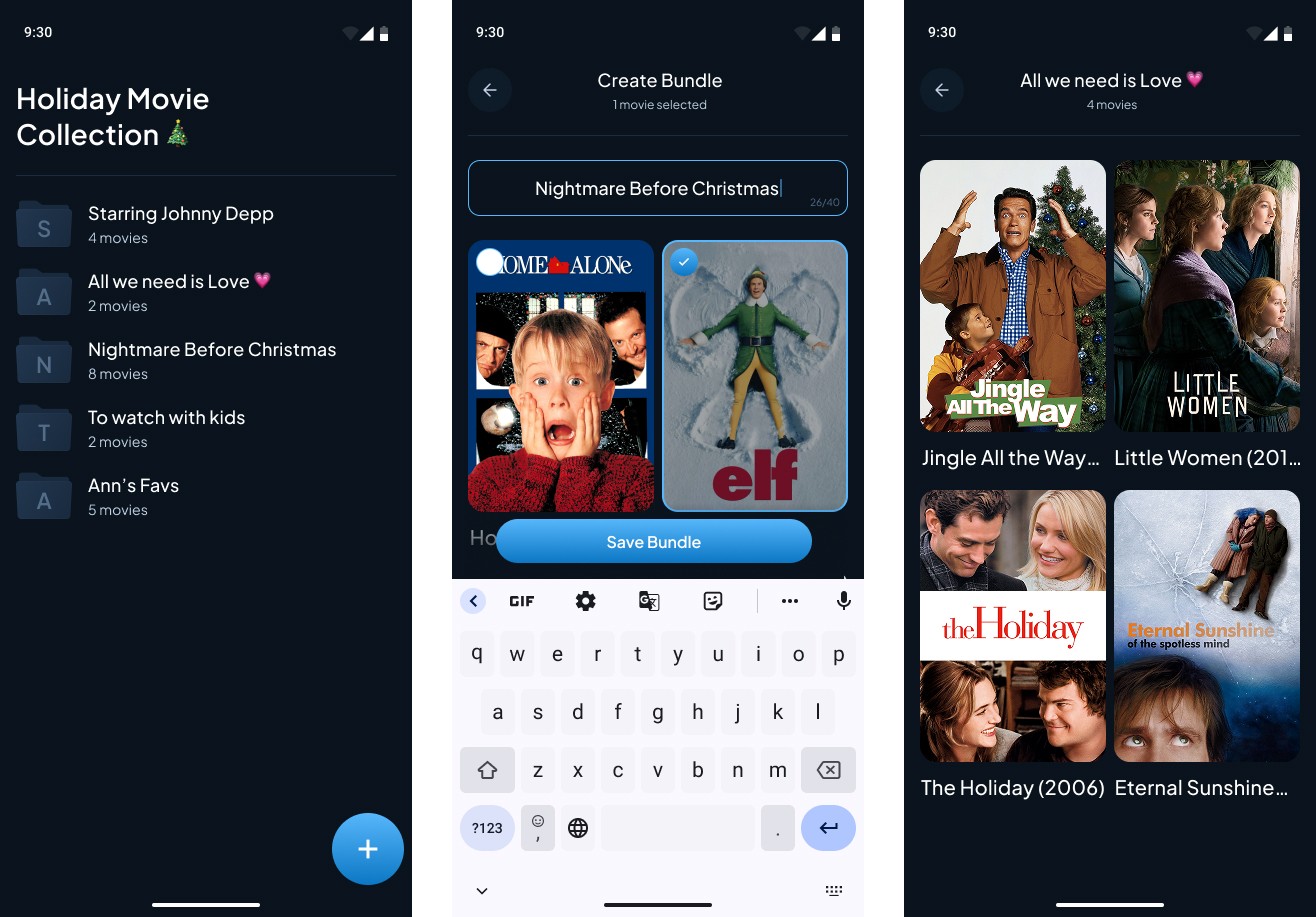
🎭 Scenario

This mini-challenge simulates a simple holiday movie collections app where users create custom bundles of movies. The challenge focuses on practicing local data persistence using Room, with an emphasis on relational database design and many-to-many relationships between movie bundles and movies.

You can find the technical requirements and mockups in the attachments section ☝️


🔤 Font - Plus Jakarta Sans

🔗  Useful Links for This Challenge

🤔 What's Allowed?

  • Standard Android/Jetpack libraries

  • Room for local data persistence.

  • Simple navigation between screens.

⚠️ What's not important

  • Responsiveness across every device size or orientation is not mandatory.

  • Light/Dark mode support.

  • Advanced error handling or edge cases.

  • Editing or deleting existing bundles.

  • Animations or visual effects.


🏆 Submission & Rewards

  • A successful submission of this challenge via the /submit-challenge command on Discord grants you 100 XP. You can use it in any channel on Discord :)

  • A successful submission consists of these parts

    1. A link to a Gist showing your code for this challenge.

    2. A screen recording (max 40 seconds) showing:

      • Opening the app and displaying the main screen with the list of movie bundles.

      • Creating a new bundle by:

        • entering a bundle name;

        • selecting one or more movies;

        • saving the bundle.

      • Returning to the main screen and confirming that the new bundle appears alongside the existing ones.

      • Opening different bundles (including the newly created one) to show:

        • the correct list of movies for each bundle;

        • that each bundle displays its own related movies correctly.

      • Restarting or reopening the app and confirming that:

        • all bundles are still present;

        • movie-to-bundle relationships are preserved.

[Lists · Search · Snackbar · Dialogs · State Management · UI] – January Recipe

textpost · published

Attachments

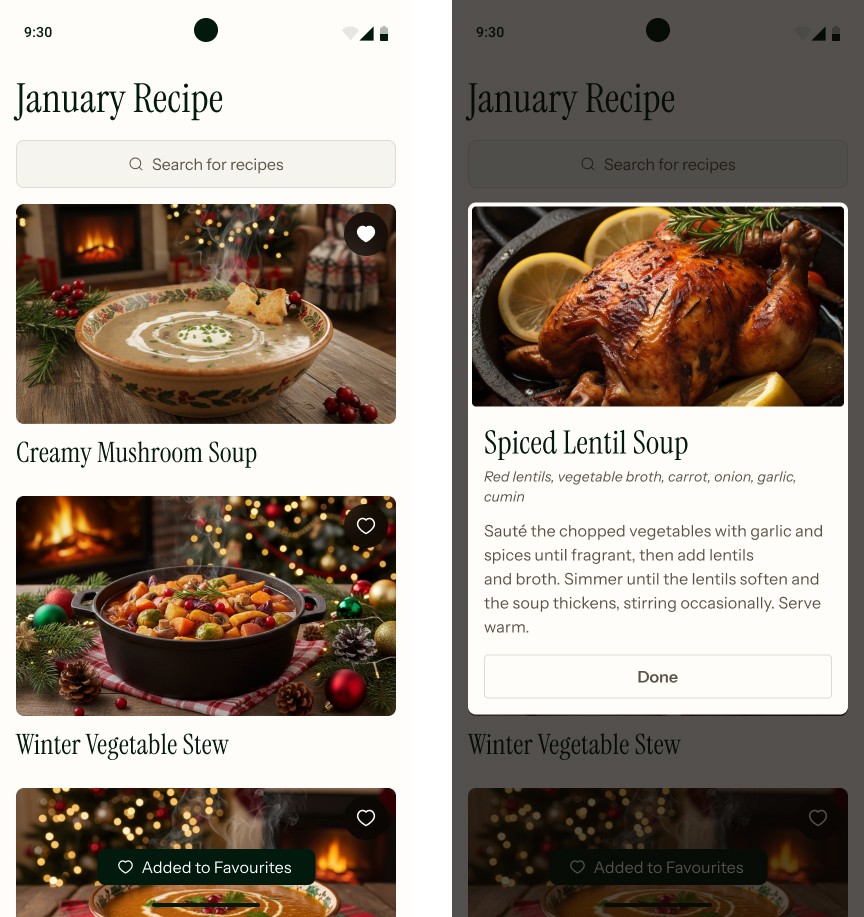
🎭 Scenario

This mini-challenge simulates a seasonal recipe browsing experience focused on winter comfort dishes. The user scrolls through a recipe feed, searches for recipes, marks favorites, refreshes the list, and views recipe details in a dialog.

You can find the technical requirements and mockups in the attachments section ☝️


🔤 Fonts - Instrument Sans, Instrument Serif

🔗 Useful Links for This Challenge

🤔 What's Allowed?

  • Standard Android/Jetpack libraries

  • No 3rd party libraries are allowed or would be required to complete this challenge

  • Simple in-memory data (hardcoded recipe list).

  • Basic state handling for search, favorites, and refresh behavior.

⚠️ What's not important

  • Responsiveness across every device size or orientation is not mandatory.

  • Light/Dark mode support.

  • Persisting data after app restart.

  • Networking or real backend integration.

  • Complex animations or transitions.

  • Advanced error handling or edge cases.


🏆 Submission & Rewards

  • A successful submission of this challenge via the /submit-challenge command on Discord grants you 200 XP. You can use it in any channel on Discord :)

  • A successful submission consists of these parts

    1. A link to a Gist showing your code for this challenge.

    2. A screen recording (max 30 seconds) showing:

      • Opening the app and displaying the main recipe feed.

      • Filtering the list using the search field.

      • Marking recipes as favorites and showing that favorites move to the top.

      • Displaying a snackbar after marking a recipe as favorite.

      • Performing a pull-to-refresh gesture and showing that non-favorite recipes are shuffled.

      • Opening a recipe details dialog and closing it.

      • For wide screens, attach two screenshots showing the main screen and the recipe details dialog.

[Gestures · Image Processing · Persistence · State Management · UI] – Profile Avatar Editor

textpost · published

Attachments

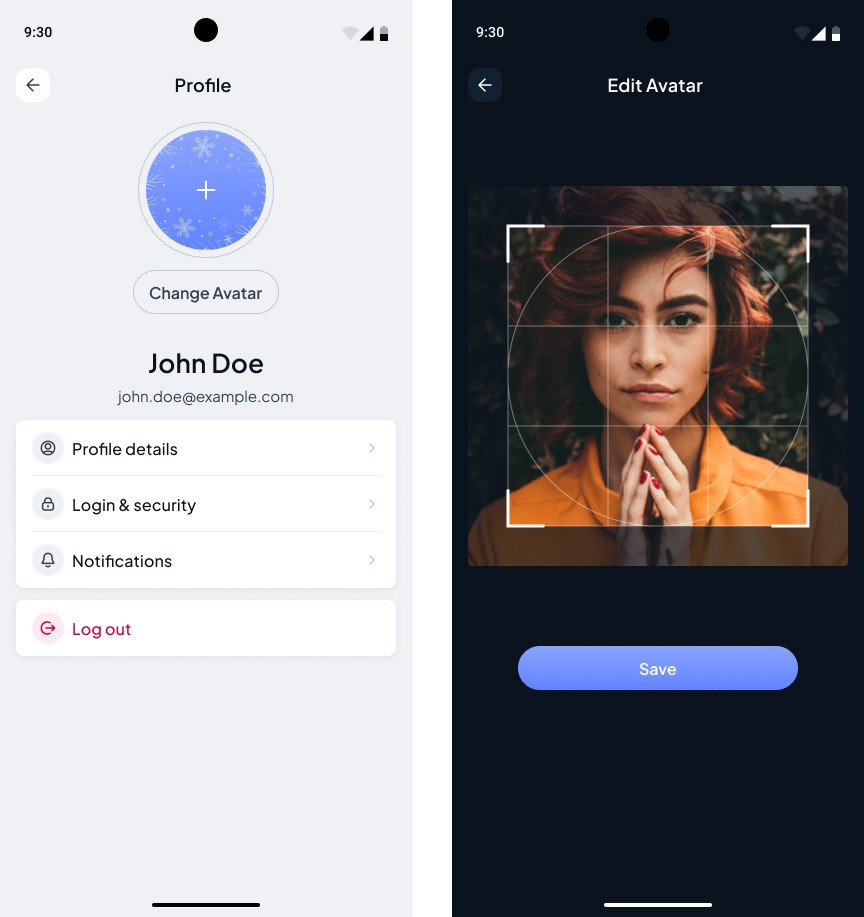
🎭 Scenario

This mini-challenge simulates a profile avatar editing flow in an offline-first app. The user selects a photo, adjusts a cropping frame to choose the desired area, saves the avatar, and sees the updated profile picture persist across app restarts.

You can find the technical requirements and mockups in the attachments section ☝️


🔤 Font - Plus Jakarta Sans

🔗 Useful Links for This Challenge

🤔 What's Allowed?

  • Standard Android/Jetpack libraries

  • No 3rd party libraries are allowed or would be required to complete this challenge

⚠️ What's not important

  • Responsiveness across every device size or orientation is not mandatory.

  • Light/Dark mode support.

  • Network access or cloud storage.

  • Uploading the avatar to a backend.

  • Advanced image editing features (filters, rotation, effects)

  • Handling every possible edge case for image formats or sizes


🏆 Submission & Rewards

  • A successful submission of this challenge via the /submit-challenge command on Discord grants you 300 XP. You can use it in any channel on Discord :)

  • A successful submission consists of these parts

    1. A link to a Gist showing your code for this challenge.

    2. A screen recording (max 30 seconds) showing:

      • Opening the app and displaying the Profile screen with the default avatar placeholder.

      • Tapping Change Avatar and opening the system photo picker.

      • Selecting an image and navigating to the Edit Avatar screen.

      • Moving and resizing the cropping frame to select a specific area of the image.

      • Saving the avatar.

      • Returning to the Profile screen and showing the updated avatar.

      • Restarting the app and confirming that the saved avatar is still displayed.