Natour
← Back to chapters

August 2025 - Async Adventures

[Coroutines · Flow · Data Filtering · UI] - Thermometer Trek

textpost · published

Attachments

🎭 Scenario

This challenge simulates reading temperature data from a virtual sensor. Your goal is to build a UI that processes a data stream: filters it, transforms it, and displays only valid readings.


🎯 Feature Goal

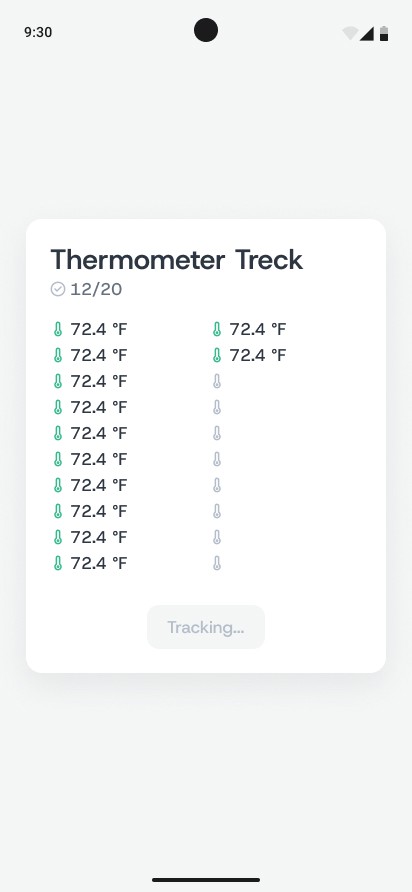
Display a stream of temperature readings in the UI, showing only valid values, and stop collecting data after 20 valid samples. After completion, the user should be able to start a new stream again.
📌 Requirements

  • Light theme

  • Centered layout

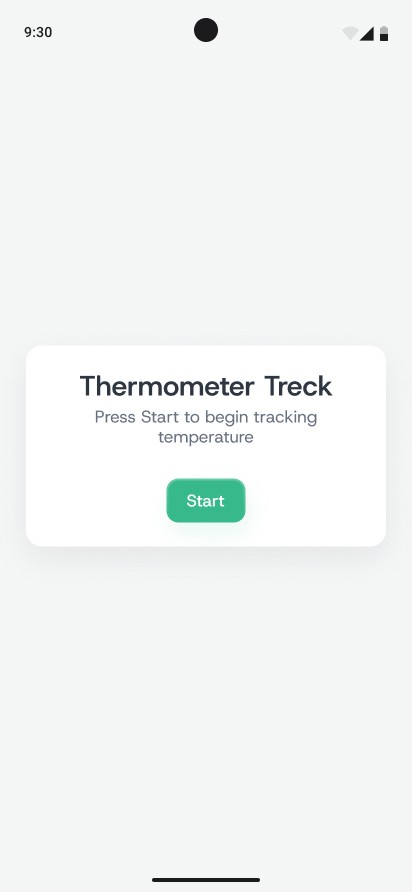
  • Initial screen with a Start button

  • After pressing Start, the UI switches to a list of readings and a progress indicator

  • After the stream completes, a Reset button appears

  • Pressing Reset starts a new stream — it does not return to the initial screen


⚙️ How it works under the hood

You are given a predefined list of temperature values that simulates the output from a virtual sensor:

listOf( -100.0, 0.0, -30.5, 10.0, 20.0, -60.0, 35.5, -51.3, 22.0, 19.8, 45.0, 55.1, 60.2, 90.0, -49.9, 5.0, 12.3, 8.8, 0.5, -2.0, 30.0, 35.0, 27.5, 18.1, 15.6, 11.0, 17.3, 33.8, 41.2, -80.0 )

Your task is to build a Flow that:

  • Emits each temperature every 250 ms

  • Filters out values below -50 °C

  • Converts the remaining values to °F using the formula: °F = (°C × 9 / 5) + 32

  • Stops after receiving exactly 20 valid samples


🤔 What's Allowed?

  • Standard Android/Jetpack libraries

  • No 3rd party libraries are allowed or would be required to complete this challenge

⚠️ What's not important

  • Responsiveness across every device size or orientation is not mandatory.

  • Animations - although adding them would make a lot of sense 🙂


🏆 Submission & Rewards

  • A successful submission of this challenge via the /submit-challenge command on Discord grants you 100 XP. You can use it in any channel on Discord :)

  • A successful submission consists of these parts

    1. A link to a Gist showing your code for this challenge.

    2. A screen recording (max 20 seconds) showing:

      • Starting the stream

      • Progressively adding temperature readings

      • Reaching 20 values

      • Restarting the stream via Resetnce
[Coroutines · Channels · Realtime Processing · UI] - Order Queue Outpost

textpost · published

Attachments

🎭 Scenario

This challenge simulates a real-time order queue system. A producer sends orders into a channel with a fixed delay, while a consumer processes them with a random delay. If the consumer is paused or slower than the producer, the queue starts to grow — eventually reaching and exceeding its capacity.


🎯 Feature Goal

Build a UI that visually reflects how the queue grows or shrinks depending on the system state. The user can toggle between Pause and Start to observe queue behavior in real time.


📌 Requirements

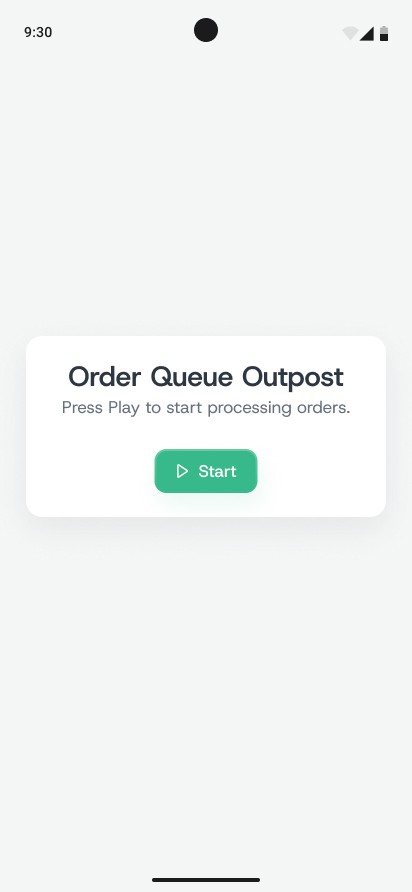
  • Initial screen:

    • Title: Order Queue Outpost

    • Description: "Press Play to start processing orders"

    • Button: ▶️ Start

The key idea of this challenge is to simulate the interaction between a producer and a consumer in real time.

  • When "Start" is pressed:

    • The producer begins sending orders into the queue with a fixed delay (250 ms between each new order).

    • The consumer starts processing orders with a random delay (100–250 ms).

    • Since the consumer’s speed is usually greater or equal to the producer’s speed, the queue either remains stable or grows slowly.

  • When "Pause" is pressed:

    • The consumer stops completely and no longer processes orders.

    • The producer continues to push new orders at the same rate (250 ms).

    • The queue starts growing, visually reflected by:

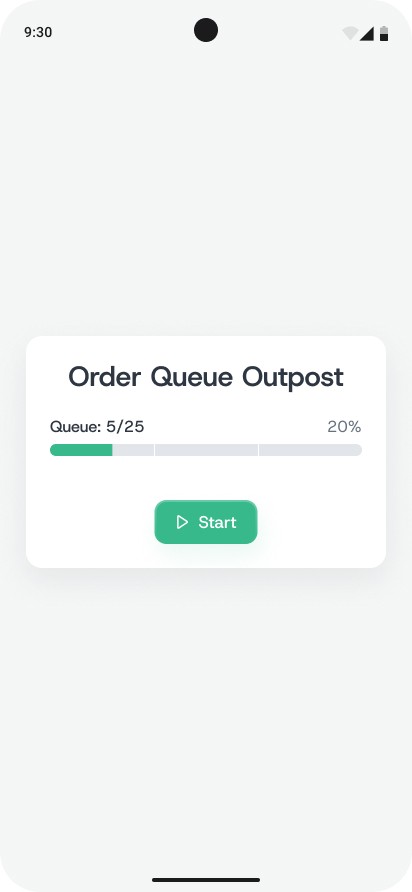
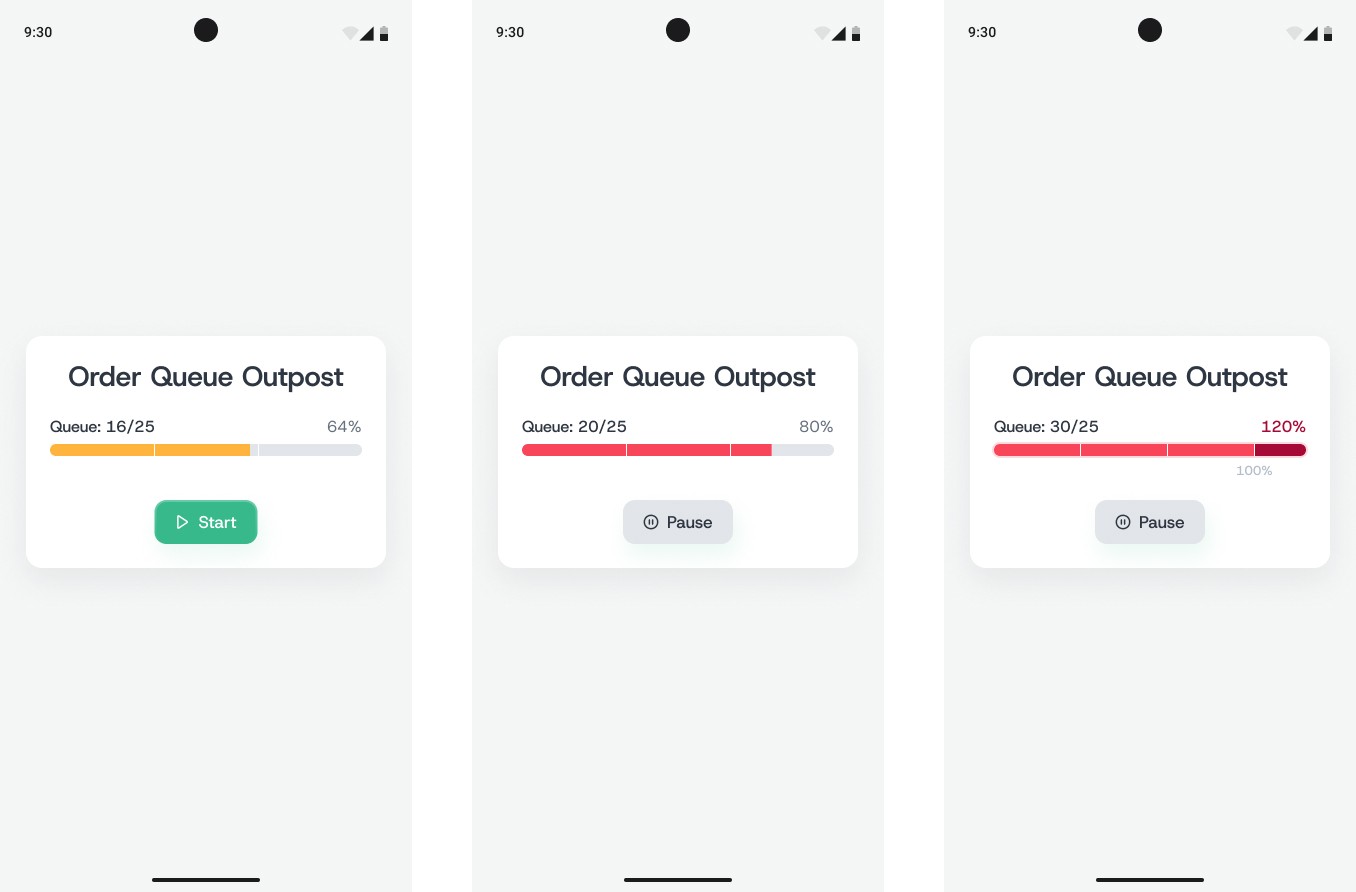
      • A queue counter (e.g., Queue: 10/25)

      • A progress bar changing color:

        • 0–33% → green

        • 34–66% → yellow

        • 67–100% → red

        • 100% → overflow state (with animation as shown in the Figma mockup)

  • When "Start" is pressed again:

    • The consumer resumes processing orders.

    • Since its speed is higher than the producer’s, the queue starts decreasing.

    • The progress bar gradually transitions back in color and returns to a value below 100%.

The main visual effect of this challenge is queue growth during pause and queue shrinkage after the consumer resumes.


🔢 Initial Data for Testing

val orders = (1..50).toList()
val orderChannel = Channel<Int>(capacity = 25)
  • The producer emits one orderId every 250ms into orderChannel

  • The consumer reads from the channel with a random delay: delay(Random.nextLong(100, 250))

  • In Pause mode, the consumer stops completely

  • In Start mode, the consumer resumes

  • If the queue is full, the producer continues to emit orders (overflow state)

  • The UI must reflect all queue changes numerically and visually


🤔 What's Allowed?

  • Standard Android/Jetpack libraries

  • No 3rd party libraries are allowed or would be required to complete this challenge

⚠️ What's not important

  • Responsiveness across every device size or orientation is not mandatory.

  • Displaying actual order IDs is optional

  • Any stylistic or visual effects outside what’s clearly shown in the Figma mockup


🏆 Submission & Rewards

  • A successful submission of this challenge via the /submit-challenge command on Discord grants you 100 XP. You can use it in any channel on Discord :)

  • A successful submission consists of these parts

    1. A link to a Gist showing your code for this challenge.

    2. A screen recording (max 20 seconds) showing:

      • Tapping Start to begin queue processing

      • Tapping Pause and waiting for the queue to fill

      • Visual overflow once the queue exceeds capacity

      • Tapping Start again to resume processing

      • The progress bar returning below 100%

[Coroutines · Concurrency · Image Loading · UI] - Parce Pigeon Race

textpost · published

Attachments

🎭 Scenario

This challenge simulates parallel downloading of six images to test concurrency, show individual progress, and measure actual time and size for each task. The user can restart the process and observe different results each time.


🎯 Feature Goal

Create a simple interface that displays the download progress of each image, shows final metrics, and indicates the total time it took to complete all tasks.


📌 Requirements

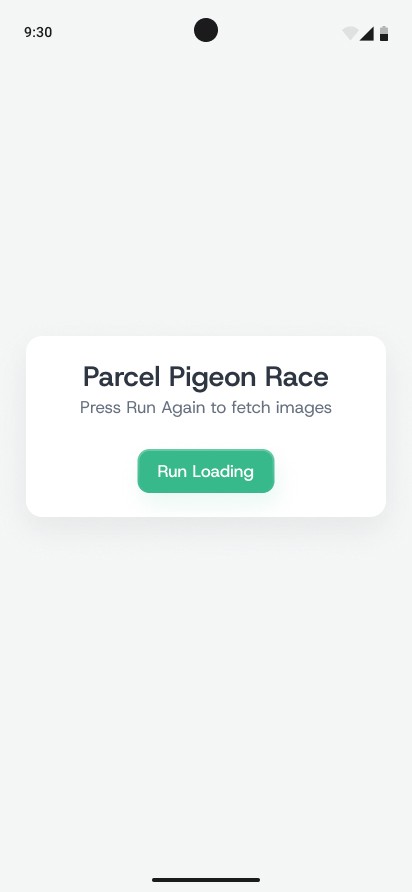
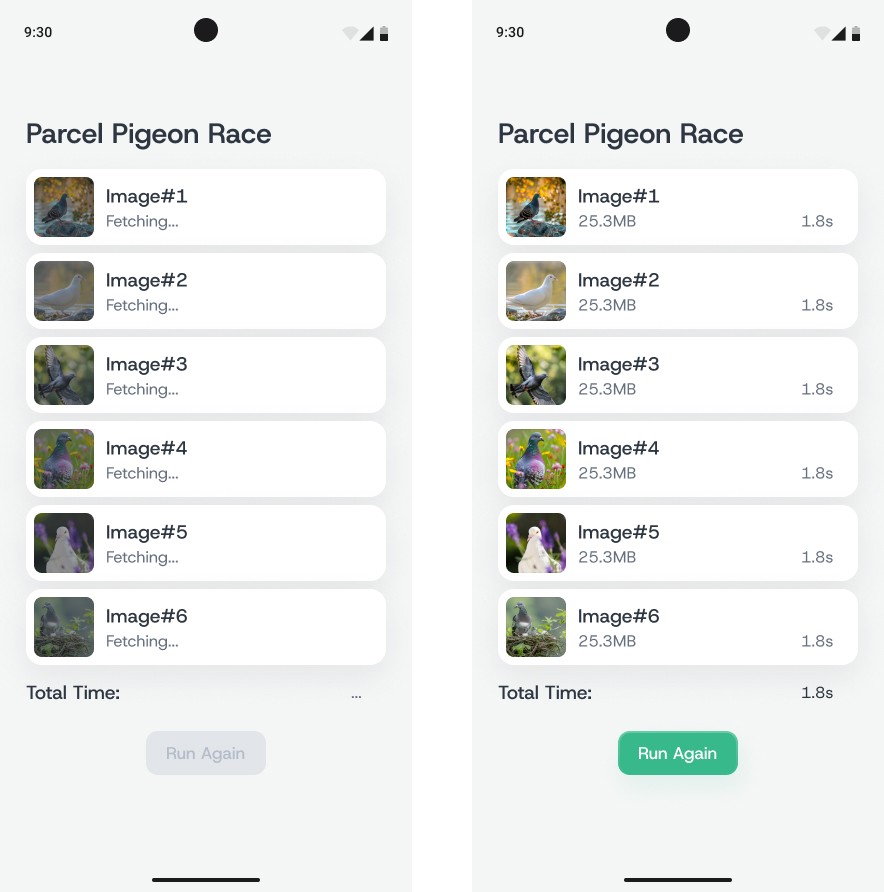
  • In the initial (empty) state, a centered card is displayed with the challenge title, the message: "Press Run Again to fetch images" and a Run Loading button.

  • Once the download starts, a list of six image entries appears, each initially labeled Fetching....

  • The order of items in the list must remain fixed and reflect the launch order, not the completion order.

  • When an image finishes downloading, its row is updated in-place to show:

    • a thumbnail of the image,

    • the download duration in seconds (e.g., 1.8s),

    • and the file size in megabytes (e.g., 2.3MB).

  • After all downloads complete, the Total Time section displays the overall time taken — which should match the longest individual download.

  • The Run Again button below the Total Time section restarts the process with a new set of random images.

  • Downloads must run in parallel, independently, without waiting for one another to finish.

  • Duration and size must be measured based on actual data transfer, not set manually or simulated.


🔢 Initial Data for Testing


🤔 What's Allowed?

  • Standard Android/Jetpack libraries

  • You may use any appropriate image loading library, such as Glide, Coil, or Picasso.

⚠️ What's not important

  • Full screen size or orientation adaptability

  • Stability of image content or file size — full randomness is expected.

  • Exact simulation of network latency — concurrency is more important than specific timings.


🏆 Submission & Rewards

  • A successful submission of this challenge via the /submit-challenge command on Discord grants you 100 XP. You can use it in any channel on Discord :)

  • A successful submission consists of these parts

    1. A link to a Gist showing your code for this challenge.

    2. A screen recording (max 20 seconds) showing:

      • Tapping the start button

      • All items showing Fetching...

      • Completion of items with thumbnails, duration, and size

      • The result appearing in the Total Time section

      • Restarting via the Run Again button.

[Coroutines · Real-time Monitoring · Timer · UI] - Heartbeat Sentinel

textpost · published

Attachments

🎭 Scenario

This challenge simulates real-time monitoring of three stations. Each station emits a "heartbeat" signal at its own frequency. If a station goes silent for more than 2 seconds, it is considered offline — a status message is displayed and a snackbar appears. When the heartbeat resumes, the status returns to online and another snackbar is shown.


🎯 Feature Goal

Create a real-time interface to display the status of all three stations. Show a green indicator when the station is alive, and red when it has been silent for over 2 seconds. Display a snackbar when a station goes offline or comes back online.


📌 Requirements

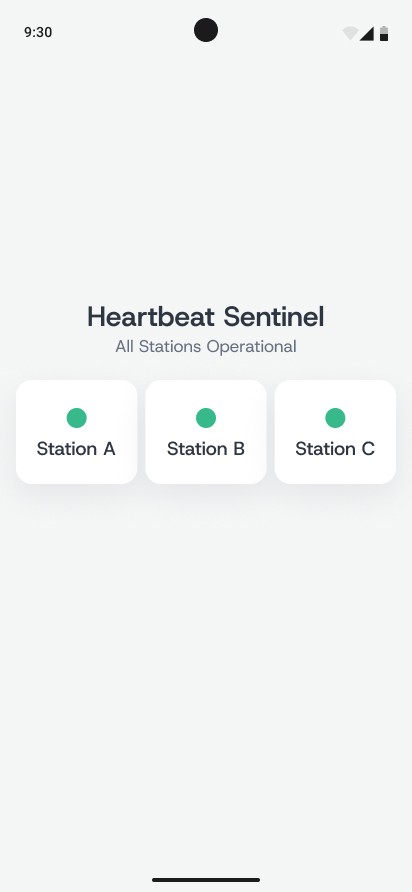
  • The screen title must be Heartbeat Sentinel.

  • The subtitle All Stations Operational is shown only when all stations are online.

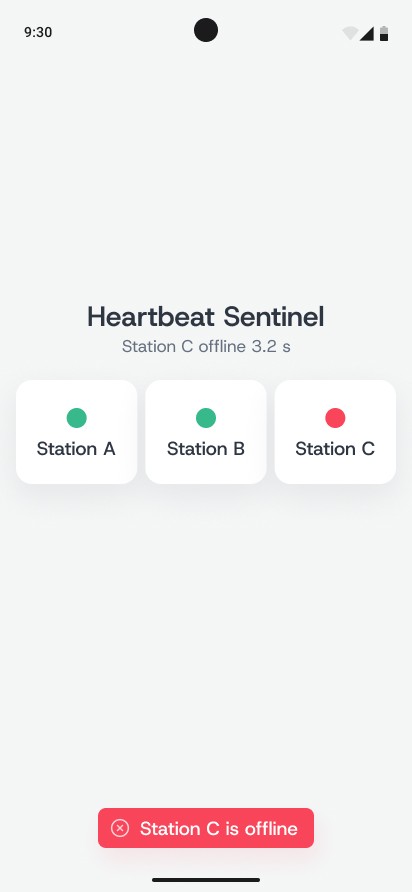
  • If at least one station is offline, the subtitle is replaced with a message like: “Station C offline 3.2 s” — showing the first station that went offline and how long it has been silent.

  • There must be a visual status row with three stations:

    • Station A emits a heartbeat every 300 ms

    • Station B every 700 ms

    • Station C every 1 second

    • The heartbeat animation for each station (blink timing and behavior) is shown in the Figma mockup

  • Each station is displayed as a circle indicator (🟢 or 🔴) with a label: Station A / B / C

  • If a station goes silent for more than 2 seconds:

    • The indicator turns red (🔴)

    • A snackbar appears: “Station X is offline”

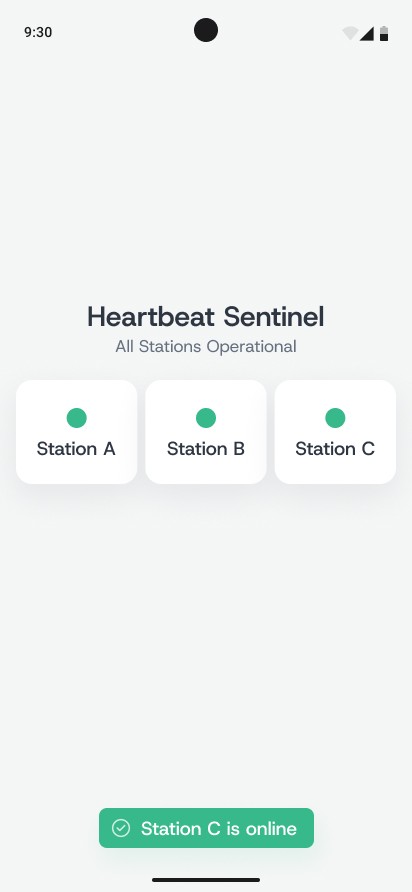
  • When the signal resumes:

    • The indicator turns green (🟢)

    • A snackbar appears: “Station X is back online”

  • Snackbars disappear automatically after a few seconds.

  • The blinking animation for each station must follow the Figma mockup.


🧪 Initial Test Scenarios

To verify correct behavior, implement the following steps:

  1. Station C should go silent for about 4 seconds

    – Its status must switch to offline (🔴)

    The subtitle should display: “Station C offline 4.0 s”

    A snackbar appears: “Station C is offline”

    – After a few seconds, the heartbeat resumes

    – Station C returns to green, the subtitle goes back to “All Stations Operational”

    A snackbar appears: “Station C is back online”

    – Let Station C run normally again for 3–5 seconds

  2. Second phase

    – Station C goes silent again for at least 8 seconds

    – While it's silent, send the app to the background

    – After a few seconds, bring the app back to the foreground

    The subtitle must still show that Station C is offline

    – The offline duration must be preserved and shown correctly (e.g., “Station C offline 6.2 s”)


🤔 What's Allowed?

  • Standard Android/Jetpack libraries

  • No 3rd party libraries are allowed or would be required to complete this challenge

⚠️ What's not important

  • Responsiveness across every device size or orientation is not mandatory.


🏆 Submission & Rewards

  • A successful submission of this challenge via the /submit-challenge command on Discord grants you 200 XP. You can use it in any channel on Discord :)

  • A successful submission consists of these parts

    1. A link to a Gist showing your code for this challenge.

    2. A screen recording (max 20 seconds) showing:

      • Initial app behavior with all stations online and blinking

      • How Station C goes offline and comes back online, with correct snackbars and subtitle updates

      • How, after sending the app to background while Station C is silent, the offline status and duration remain intact when the app returns to foreground

[Coroutines · Concurrency · Real-time Feed · UI] - Live Ticker Aggregator

textpost · published

Attachments

🎭 Scenario

The application simulates real-time price updates streaming from multiple stock exchanges. Each exchange emits its own updates independently, with varying frequency and random delays. All updates appear in a shared ticker feed, which displays only the 10 most recent entries. The user can pause or resume screen updates, and observe how the system handles a simulated failure of one feed, followed by automatic recovery.


🎯 Feature Goal

Provide a real-time ticker interface that displays the latest updates from multiple stock exchanges, allows toggling screen updates via Pause/Resume, shows the current tick rate, and handles simulated failures of one of the data sources.


📌 Requirements

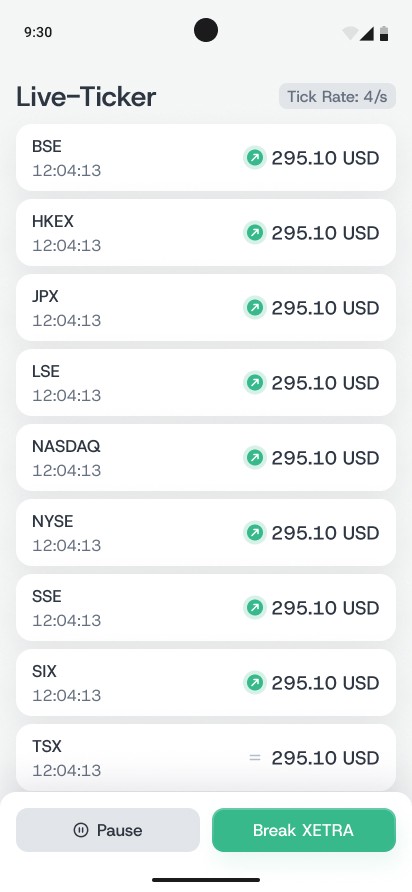
  • The top of the screen displays:

    1. A title: Live–Ticker, aligned to the left.

    2. A badge Tick Rate: 4/s, aligned to the top right. The Tick Rate shows how often the simulation checks for new updates from the feed sources. For example, a value of 4/s means the system updates the ticker state every 250 ms. This value only defines the rhythm at which events appear on screen.

  • The main ticker contains a fixed list of exchanges, sorted alphabetically:

    BSE, HKEX, JPX, LSE, NASDAQ, NYSE, SSE, SIX, TSX, XETRA

  • All items have equal height and stay in constant order unless a failure occurs.

  • Each feed item includes:

    – the exchange abbreviation (e.g., NASDAQ)

    – the timestamp of the latest update (HH:mm:ss)

    – the price with currency (e.g., 295.10 USD)

    – a direction indicator: arrow up (price increased), arrow down (price decreased), equals sign (price stayed the same)

  • State of direction indicators (arrows):

    • Colored arrows with background — normal working state, when updates are occurring as expected.

    • Colored arrows without background — the entire list is in a paused state; on-screen updates are halted, but new data continues buffering in the background.

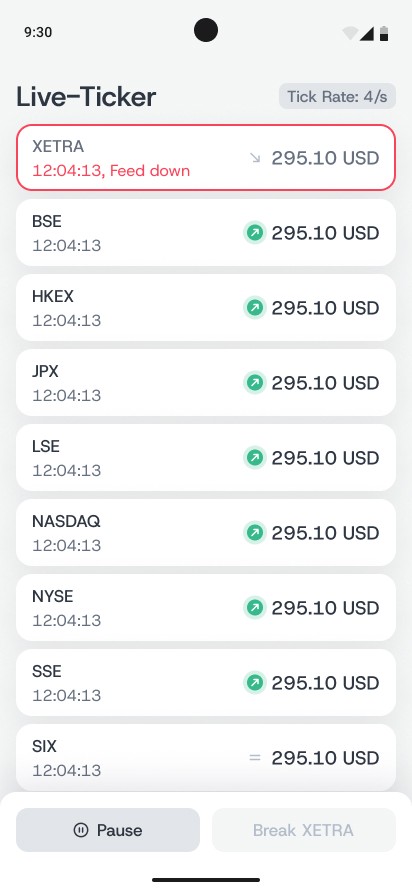
    • Gray arrows — the corresponding feed is down. In this case, the arrow points down, the price and timestamp freeze, and the card displays other failure indicators as described in the failure scenario.

  • Each feed updates independently, with its own frequency and random delay. When a feed updates, the direction arrow pulses briefly (animation shown in Figma mockups).

Control Panel

At the bottom of the screen, there is a separate control panel — a white rectangular container with rounded corners, visually distinct from the main feed area.

  • Pressing Pause freezes the visible list. New ticks continue buffering in the background.

  • Pressing Resume jumps the view to the current state.

  • Pressing Break XETRA simulates a failure of the XETRA feed. In this state:

    • the XETRA card is highlighted with a red border

    • the direction arrow turns gray and points down

    • the price and timestamp freeze

    • a red Feed down label appears

    • the XETRA item is moved to the top of the list for visibility

  • All other feeds continue working normally. After 4 seconds, XETRA automatically recovers and returns to its standard appearance and alphabetical position.


🔢 Initial Data for Testing

  • Use the following feed definitions with fixed parameters (initial price and update interval in milliseconds):

    • BSE — 99.95 USD / 2000 ms

    • HKEX — 98.00 USD / 2000 ms

    • JPX — 96.80 USD / 4000 ms

    • LSE — 105.70 USD / 5000 ms

    • NASDAQ — 134.10 USD / 3000 ms

    • NYSE — 118.35 USD / 3000 ms

    • SSE — 110.25 USD / 5000 ms

    • SIX — 115.50 USD / 4000 ms

    • TSX — 122.90 USD / 3000 ms

    • XETRA — 140.40 USD / 1000 ms

  • On each update, apply the following logic per feed:

    1. Randomly decide one of three states:

      • "no change"

      • "increase"

      • "decrease"

    2. If increasing or decreasing, adjust the price by a random amount between 0.01 and 1.00 USD.

  • The last update time (HH:mm:ss) should only change when the individual feed performs its scheduled update, based on its own update interval.

🤔 What's Allowed?

  • Standard Android/Jetpack libraries

  • No 3rd party libraries are allowed or would be required to complete this challenge

⚠️ What's not important

  • Responsiveness across every device size or orientation is not mandatory.

  • Millisecond-level synchronization across feeds is not required.


🏆 Submission & Rewards

  • A successful submission of this challenge via the /submit-challenge command on Discord grants you 300 XP. You can use it in any channel on Discord :)

  • A successful submission consists of these parts

    1. A link to a Gist showing your code for this challenge.

    2. A screen recording (max 20 seconds) showing:

      • Feeds updating in real time

      • Pressing Pause, waiting a few seconds, then pressing Resume, verifying that buffered values appear instantly

      • Pressing the Break XETRA button and confirming:

        • XETRA moves to the top of the list

        • A red border and Feed down label appear

        • All other feeds continue updating

      • Waiting until XETRA auto-recovers and returns to its normal appearance and alphabetical position

      • Rotating the device (portrait ↔ landscape) and confirming that all state is preserved