Natour
← Back to chapters

November 2025 - Black Friday Madness

[Gestures · State Management · UI] - Hidden Discount Swipe

textpost · published

Attachments

🎭 Scenario

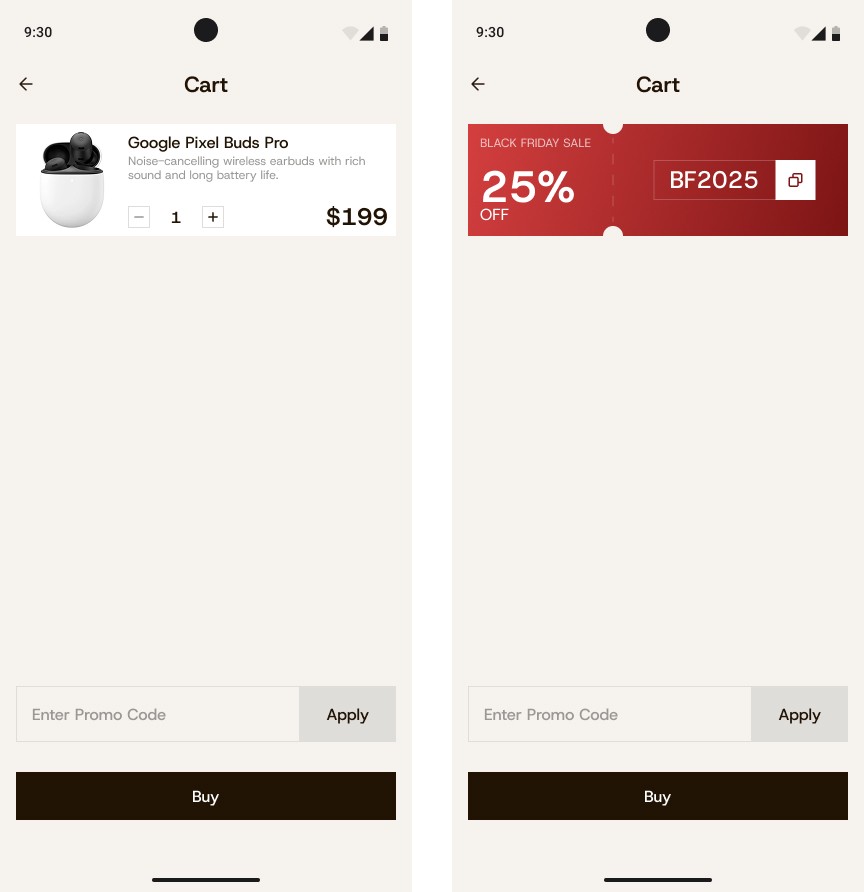
This mini-app simulates a shopping cart screen in an e-commerce app. The user can view a single product card, swipe it to reveal a hidden promo panel, copy a discount code, and apply it in a text field below the card.

You can find the technical requirements and mockups in the attachments section ☝️

🔤 Fonts - Host Grotesk

🔗 Useful Links for This Challenge

🤔 What's Allowed?

  • Standard Android / Jetpack libraries.

  • Use of Jetpack Compose Gesture APIs (e.g., swipeable, animateFloatAsState).

  • Material 3 components or simple custom ones.

  • Use of SnackbarHost or AnimatedVisibility for feedback messages.

  • Hardcoded promo code validation logic.

⚠️ What's not important

  • Real backend or promo validation API (hardcoded logic only).

  • Multiple products or cart list (only one item required).

  • Quantity modification (buttons are static).

  • Complex animation physics (simple horizontal transition is enough).

  • Advanced error styling (basic red text is fine).


🏆 Submission & Rewards

  • A successful submission of this challenge via the /submit-challenge command on Discord grants you 100 XP. You can use it in any channel on Discord :)

  • A successful submission consists of these parts

    1. A link to a Gist with your implementation

    2. A screen recording (max 20 seconds) showing:

      • Swiping the product card to reveal the promo panel.

      • Copying the promo code (“Copied!” message appears).

      • Applying a valid code — discount applied to $149.

      • Entering an invalid code — “Invalid code” shown.
[Lazy Grids · Scroll Behavior · State Management · UI] - Sticky Ad Banner

textpost · published

Attachments

🎭 Scenario

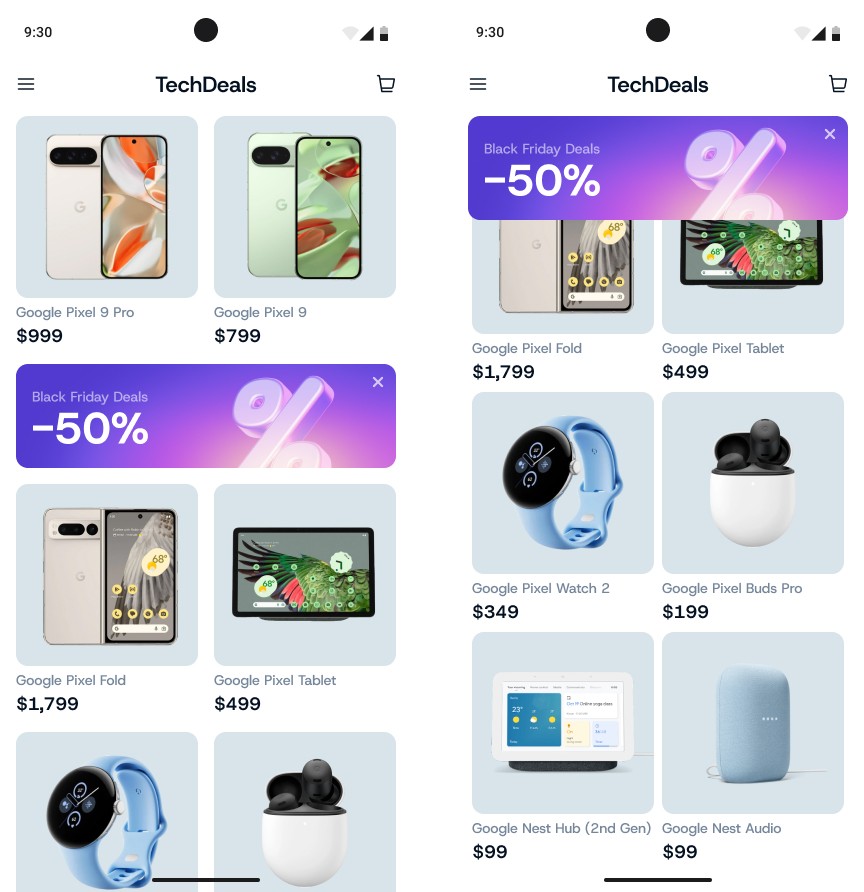
This mini-app simulates an electronics store screen with a product grid and a Black Friday advertisement banner that initially appears in the middle of the list and becomes a sticky header when scrolling.

You can find the technical requirements and mockups in the attachments section ☝️


🔤 Fonts - Host Grotesk

🔗 Useful Links for This Challenge

🤔 What's Allowed?

  • Standard Android/Jetpack libraries only.

  • Use Material 3 components or simple custom UI elements.

  • Static hardcoded product list (no external data source).

⚠️ What's not important

  • Functional behavior of the cart or menu icons.

  • Fetching or loading data from a remote source.

  • Complex or physics-based animations.

  • Tablet optimization (mobile view only).


🏆 Submission & Rewards

  • A successful submission of this challenge via the /submit-challenge command on Discord grants you 100 XP. You can use it in any channel on Discord :)

  • A successful submission consists of these parts

    1. A link to a Gist showing your code for this challenge.

    2. A screen recording (max 20 seconds) showing:

      • The initial state with the banner in the middle of the list;

      • Scrolling down — the banner becomes sticky at the top;

      • Pressing “×” — the banner disappears;

      • Further scrolling — the banner does not reappear.

[Animation · State Management · UI] - Circular Stock Tracker

textpost · published

Attachments

🎭 Scenario

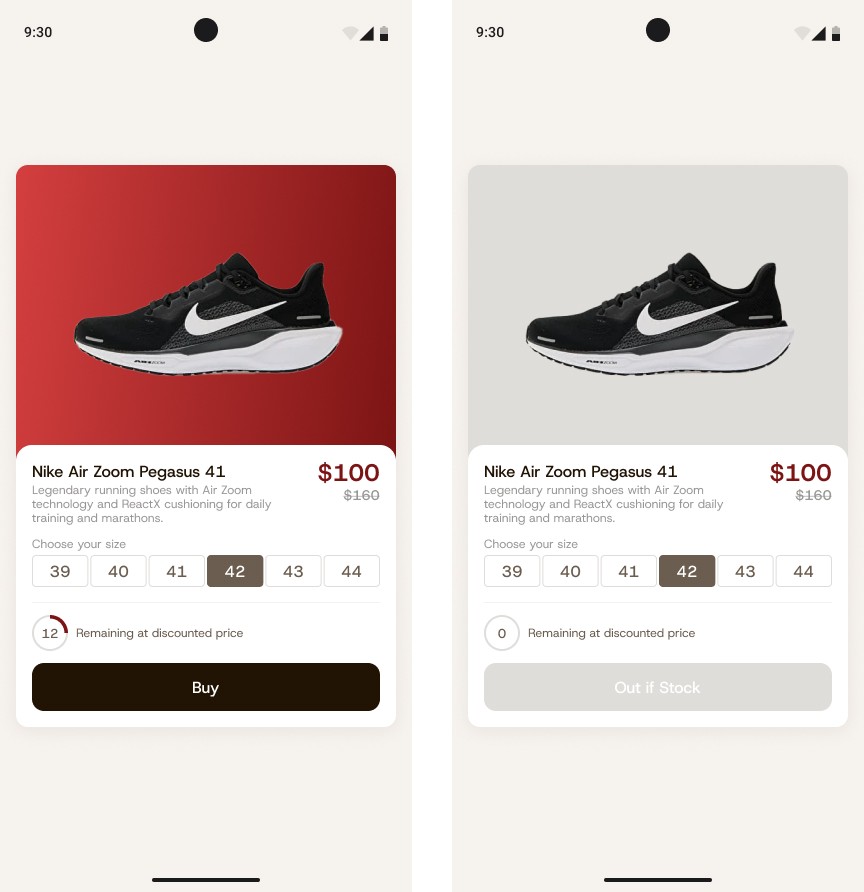
This mini-app simulates a product card screen featuring a circular indicator that shows how many discounted items remain in stock. Each time the user presses the Buy button, the remaining quantity decreases, and the circular indicator smoothly updates to reflect the change.

You can find the technical requirements and mockups in the attachments section ☝️


🔤 Fonts - Host Grotesk

🔗  Useful Links for This Challenge

🤔 What's Allowed?

  • Standard Android / Jetpack libraries.

  • Use Material 3 components or simple custom UI elements.

  • No 3rd party libraries are allowed or would be required to complete this challenge

⚠️ What's not important

  • Actual shopping cart or purchase logic.

  • Data persistence (no database or ViewModel required).

  • Complex or physics-based animations.

  • Dark mode or tablet adaptation.


🏆 Submission & Rewards

  • A successful submission of this challenge via the /submit-challenge command on Discord grants you 100 XP. You can use it in any channel on Discord :)

  • A successful submission consists of these parts

    1. A link to a Gist showing your code for this challenge.

    2. A screen recording (max 20 seconds) showing:

      • The initial state with available stock (e.g., 12).

      • Pressing Buy — the quantity decreases, progress animates smoothly, and the number scales up briefly.

      • When stock reaches 0 — the indicator becomes empty and the button shows “Out of stock”.

[Gestures · Navigation · State Management · UI] - Long Press Compare

textpost · published

Attachments

🎭 Scenario

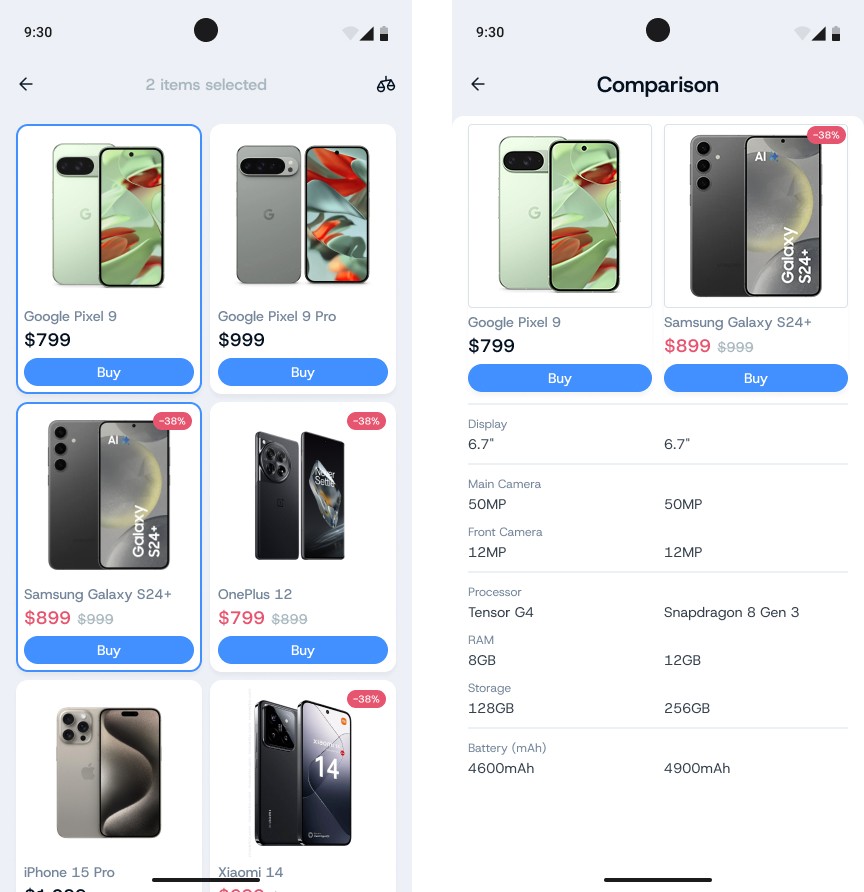
This mini-app simulates a product catalog screen, where the user can select two products for comparison using a long press gesture. After selecting two items, the Compare icon in the top bar becomes active. Tapping it opens a comparison screen that displays a side-by-side table of specifications for the selected products. If the user long-presses a third product, it replaces the last selected item (the first one remains fixed).

You can find the technical requirements and mockups in the attachments section ☝️


🔤 Fonts - Host Grotesk

🔗 Useful Links for This Challenge

🤔 What's Allowed?

  • Standard Android/Jetpack libraries

  • No 3rd party libraries are allowed or would be required to complete this challenge

⚠️ What's not important

  • Actual purchase or cart logic.

  • Network requests or backend integration.

  • Highlighting differences in the comparison table.

  • Tablet layouts or dark mode support.


🏆 Submission & Rewards

  • A successful submission of this challenge via the /submit-challenge command on Discord grants you 200 XP. You can use it in any channel on Discord :)

  • A successful submission consists of these parts

    1. A link to a Gist showing your code for this challenge.

    2. A screen recording (max 20 seconds) showing:

      • Selecting one product.

      • Selecting a second product.

      • Replacing the last selected item with a new one.

      • Opening the comparison screen and returning to the list (selection preserved).

[Localization · DataStore · State Management · UI] - Global Black Friday Deals

textpost · published

Attachments

🎭 Scenario

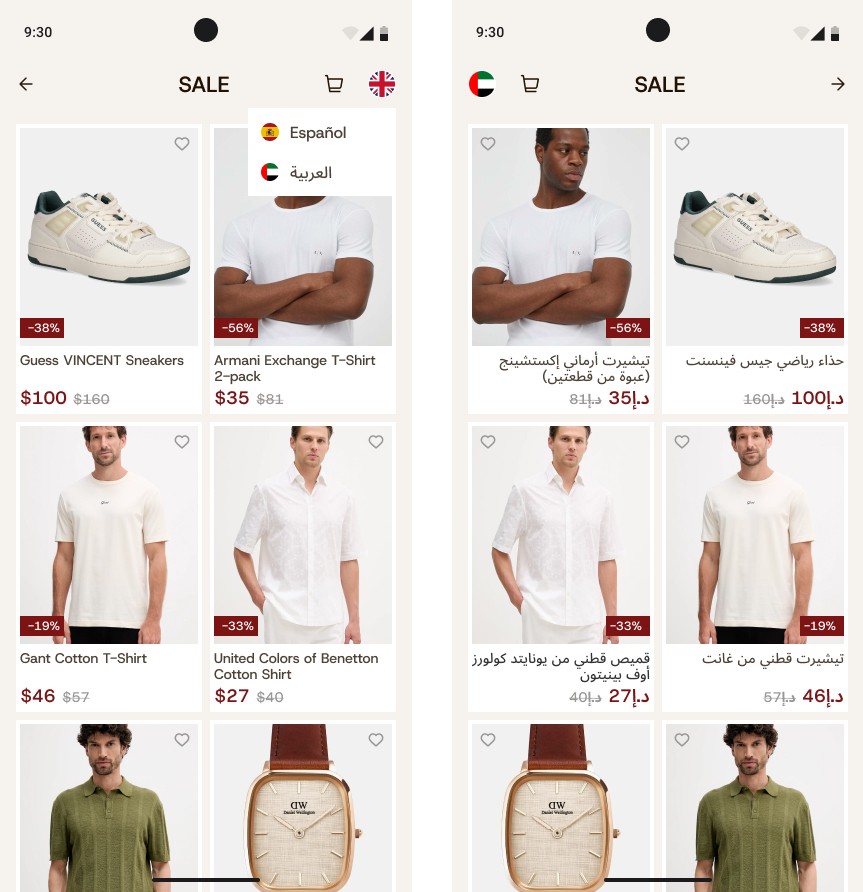
This mini-app focuses on creating a product catalog screen for a clothing store during a global sale. The goal is to implement multi-language support (English, Spanish, Arabic) with automatic updates of product texts, currencies, and number formatting. When Arabic is selected, the entire interface switches to RTL mode.

You can find the technical requirements and mockups in the attachments section ☝️


🔤 Fonts - Host Grotesk

🔗 Useful Links for This Challenge

🤔 What's Allowed?

  • Standard Android and Jetpack Compose libraries.

  • No 3rd party libraries are allowed or would be required to complete this challenge

  • Local state persistence using DataStore or SharedPreferences.

  • Hardcoded translation and pricing data for demonstration.

  • Dynamic language switching without needing to reload the screen.

⚠️ What's not important

  • Responsiveness across every device size or orientation is not mandatory.

  • Real API or database integration.

  • Complex animations (optional).

  • Alternative themes (light theme only is enough).


🏆 Submission & Rewards

  • A successful submission of this challenge via the /submit-challenge command on Discord grants you 300 XP. You can use it in any channel on Discord :)

  • A successful submission consists of these parts

    1. A link to a Gist showing your code for this challenge.

    2. A screen recording (max 20 seconds) showing:

      • Switching between English, Spanish, and Arabic.

      • Automatic updates of texts, prices, number formats, and layout direction.

      • Language state persisting after the app is closed and reopened (even after process kill).