Natour
← Back to chapters

February 2025

[Selection · Animation · UI] – Thousands Separator Picker

textpost · published

Attachments

Scenario

You are working on a budgeting app called SpendLess. You've been tasked with creating a simple custom UI component where the user can select one of a few options

Feature Goal

  • Create a UI component that highlights one of the available options and updates its selection to the option tapped.

Requirements

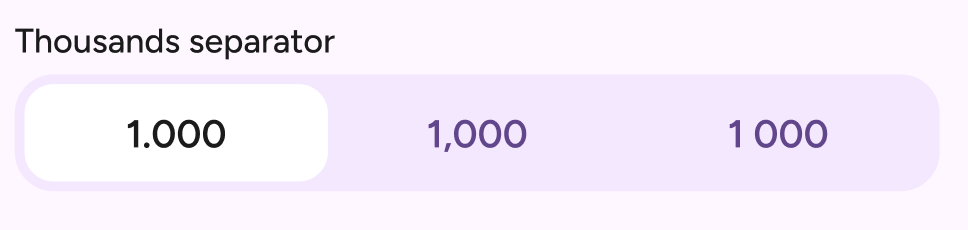
  • Include a title text: "Thousands separator"

  • Horizontal bar with three different options and rounded corners

  • The component always has one of the options selected, which is indicated by a white rounded rectangle

  • The option's text color changes based on whether its selected or not

  • Optional Extension - animate the change in selection

    • Animate the white to move to the newly selected item
🏆 Submission & Rewards

  • A successful submission of this challenge via the /submit-challenge command on Discord grants you 100 XP. You can use it in any channel on Discord :)

  • A successful submission consists of these parts

    1. A link to a Gist showing your code for this challenge.

    2. A screen recording (10s max) that shows selecting the 3rd, then 2nd and then 1st thousands separator.

[Animation · Sensors · UI · State Management] – Battery Indicator UI

textpost · published

Attachments

Scenario

You’re sipping your coffee and scrolling through your Kanban board when you notice a new ticket.

Title: Festive Battery Indicator
Description: Missed Valentine’s update. St. Patrick’s is next. Now, it’s both. Battery = heart ♥️ + clover 🍀. Make it festive.

You blink. Well… It’s definitely not the weirdest request you’ve seen. Time to bring some romantic luck to this app!

Feature Goal

  • Create a UI component that indicates the device's battery level with a unique animation for when the battery level is low and one for when the battery is sufficiently charged.

Requirements

  • Show a heart ♥️ and clover 🍀 icon at both ends of the battery level indicator

    • You can find the mockup and animation in the attachments section 👉🏼

  • Observe the device's battery level and feed the information to the UI component

  • The icons change based on the battery level percentage %

    • <= 20%

      • Heart starts pulsing on repeat continuously

      • As the heart scales up, it gets more tinted with a white color

      • Clover remains greyed out and scaled-down

    • >= 80%

      • The clover scales up slightly

      • The heart remains greyed out and scaled down

    • > 20% and < 80%

      • Both icons are greyed and scaled-down as per the mockups

  • The bar fills using an animation so that the bar appears to extend or shrink as the battery level changes

  • The bar color animates between these colours, each fully matching its color at the target % value

    • 20% - Red - #FF4E51

    • 50% - Yellow - #FCB966

    • 80% - Green - #19D181


Note: This is NOT a purely UI challenge; the battery level percentage must display the real battery % of the device it runs on.

Tip: In your Compose @Preview function, you can animate a state variable to simulate the battery %


🏆 Submission & Rewards

  • A successful submission of this challenge via the /submit-challenge command on Discord grants you 200 XP. You can use it in any channel on Discord :)

  • A successful submission consists of these parts

    1. A link to a Gist showing your code for this challenge.

    2. A screen recording (20s max) that shows each of the battery states. You can simulate this via the Android emulator.

[BroadcastReceiver · Animation · SMS Integration · UI] – SMS Confetti

textpost · published

Attachments

Scenario

You're working on a rewards-based mobile application encouraging users to complete challenges and earn prizes. You've been tasked with doing R&D (Research & Development) on a new feature request from the client that introduces a celebratory confetti animation when users receive an SMS confirming their reward.

Feature Goal

  • Show confetti animation whenever a user receives an SMS from a mobile number "+4444555551" and it matches this template: "Congratulations! You've earned 500 points.".

Requirements

  • Detect incoming SMS messages

  • Filter SMS messages based on sender and specific keywords

  • Trigger confetti animation in the app when a valid SMS is received

    • The clients have shared a GIF of a basic confetti animation they would like to see replicated as closely as possible. You can find the GIF in the attachments section 👉🏼

    • Each piece of confetti is one of the basic 2D shapes that differ in scale, rotation, and color.

  • Edge cases that don't need to be considered at this stage of development

    • SMS received when app is closed

    • Multiple SMS messages received in a short time

🏆 Submission & Rewards

  • A successful submission of this challenge via the /submit-challenge command on Discord grants you 200 XP. You can use it in any channel on Discord :)

  • A successful submission consists of these parts

    1. A link to a Gist showing your code for this challenge.

    2. A screen recording (20s max) that shows how an SMS is received and the resulting confetti animation.

[Animation · Audio Visualization · UI · State Management] – Audio Waveform UI

textpost · published

Attachments

Scenario

As part of a team working on an audio journaling mobile application, EchoJournal, you've been tasked with creating the following custom Audio Waveform UI component.

The design mockups are available in the Attachments section to the right 👉🏼

Feature Goal

  • Only create the custom UI component with a fixed amount of amplitudes that gradually gets filled and a timer that increments as it's playing.

Feature Requirements

  • The same amount of amplitudes (vertical round rectangles) has to be drawn regardless of the audio recording length.

  • The audio track must fill each amplitude while the player plays gradually (and not line by line, see the sample animation in the Attachments section +

  • 👉🏼).

  • The duration displayed increases while the player is playing.

  • The player's state resets when it reaches the end of the audio file.

Note: This is a purely UI challenge; all that is required is an @Preview function that meets the above requirements.


🏆 Submission & Rewards

  • A successful submission of this challenge via the /submit-challenge command on Discord grants you 300 XP. You can use it in any channel on Discord :)

  • A successful submission consists of these parts

    1. A link to a Gist showing your code for this challenge.

    2. A screen recording (20s max) that shows how a sample audio file plays in the component. This audio file should be at least 30s long and can be imported - it doesn't have to be recorded in the app. Additionally, tap pause/play 3x during playback.