Natour
← Back to chapters

July 2025 - Conversations

[UI · State Management] - Emoji Reaction Bubble

textpost · published

Attachments

🎭 Scenario

Your friend group chat is pure chaos — every message sparks debate, and everyone’s tired of typing “lol” or “💀” every time. Build a simple emoji reaction bubble so users can tap a message, pick an emoji, and see who reacted with what (one per person, no duplicates).


🎯 Feature Goal
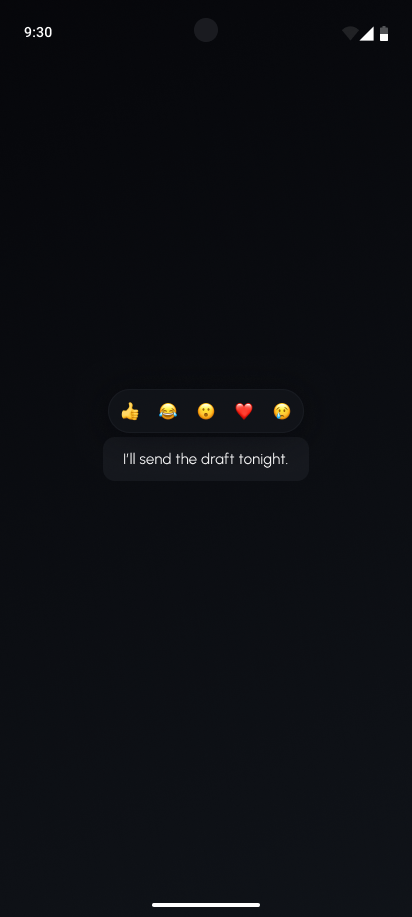
Create a tappable emoji reaction system for a chat interface. When the user taps an emoji, the reaction appears in a compact bubble inside the message, grouped with other users’ reactions.

📌 Requirements

Only dark mode is supported

  • All content is in the center of the screen

  • Reaction UI component

    • Contains a row of emojis

    • Rounded corners

    • Greyish border

    • On tap, add a new reaction the message UI component on screen
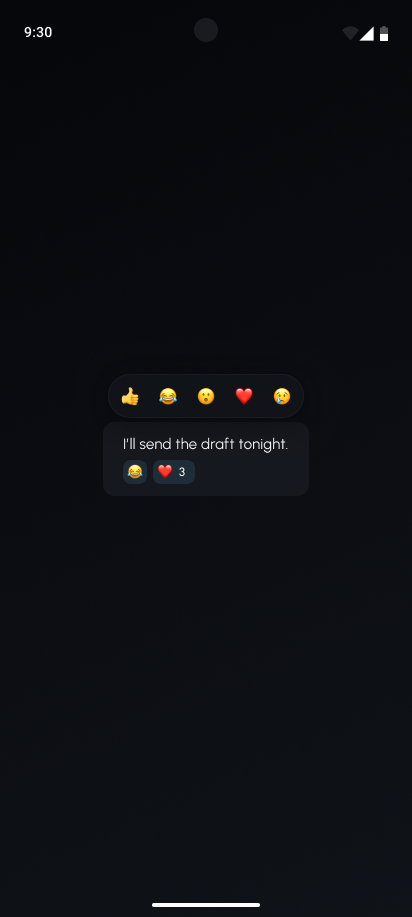
  • Message UI component

    • Contains text: “I’ll send the draft tonight.”

    • Support emoji reactions

      • These are shown below the text

      • If more than one of the same emoji is added, add the amount next to the emoji

        • For example:

        • Tap 👍🏼 will show → 👍🏼

        • Tap 😂 will show → 👍🏼 😂

        • Tap 👍🏼 will show → 👍🏼2 😂

      • Each emoji reaction has a rounded background

      • The emojis are displayed in a row and wrap to a new line when they reach the end of the composable. They should not extend the message UI component’s edge.


🤔 What's Allowed?

  • Standard Android/Jetpack libraries

  • No 3rd party libraries are allowed or would be required to complete this challenge

⚠️ What's not important

  • Responsiveness across every device size or orientation is not mandatory.

  • Animations - although adding them would make a lot of sense 🙂


🏆 Submission & Rewards

  • A successful submission of this challenge via the /submit-challenge command on Discord grants you 100 XP. You can use it in any channel on Discord :)

  • A successful submission consists of these parts

    1. A link to a Gist showing your code for this challenge.

    2. A screen recording (20s max) showcasing the addition of different emojis. You must add at least one emoji more than once
[Navigation · UI · State Management] - Bottom Navigation with Unread Badges

textpost · published

Attachments

🎭 Scenario

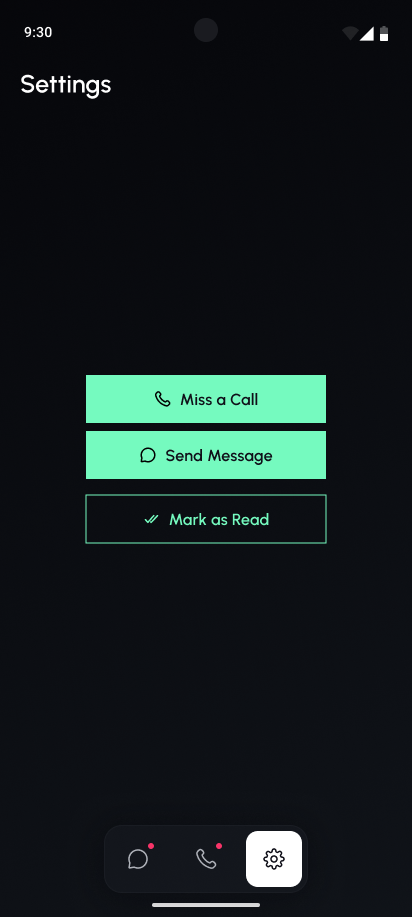
Your app has three tabs: Calls, Chats, and Settings. Users keep ignoring Calls and missing new Chats. Add unread badges to the bottom navigation so users know where to tap. Settings doesn’t need a badge (nobody rushes there anyway).


🎯 Feature Goal

Show and manage unread notification badges on the bottom navigation bar in multiple ways.

📌 Requirements

Only dark theme is supported

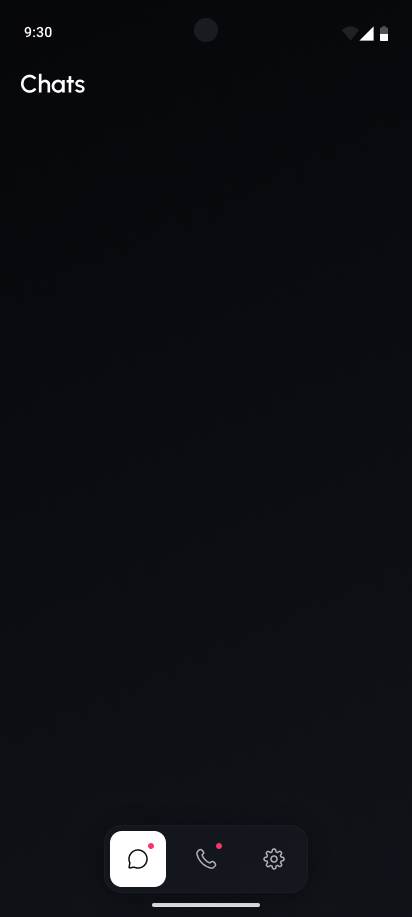
  • The app will have three top-level destinations

    • Chats, Calls, and Settings

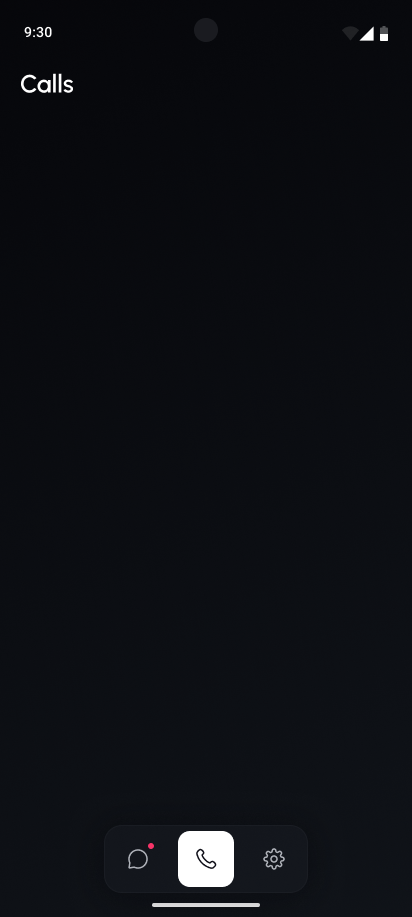
  • Each has a title in the top app bar to uniquely identify the current user destination

  • Bottom bar with 3 centered icons - each representing a navigation destination a user can navigate to

    • The default destination is Settings

    • Selected tab is highlighted with a white background

    • A red dot when the tab has unread notifications

    • Change destination when a new navigation destination is tapped

      • If the calls destination is tapped, clear the unread notification badge (i.e. remove the red dot from the calls tab)

  • The settings screen has some debug UI components in the center of the screen arrange in a column

    • “Miss a Call”

      • Icon to the left of text

      • Full green background

      • On tap create a new notification for the call tab (i.e. once tapped, the red dot on the call tab should be visible)

        • Tapping again should not remove the badge

    • “Send Message”

      • Icon to the left of text

      • Full green background

      • On tap create a new notification for the chat tab (i.e. once tapped, the red dot on the chat tab should be visible)

        • Tapping again should not remove the badge

    • “Mark as Read”

      • Black background with green border

      • Icon to the left of the text

      • On tap, remove the notifications from the tabs (i.e. remove the red dot from the chat and call tabs)


🤔 What's Allowed?

  • Standard Android/Jetpack libraries

  • No 3rd party libraries are allowed or would be required to complete this challenge

⚠️ What's not important

  • Responsiveness across every device size or orientation is not mandatory.


🏆 Submission & Rewards

  • A successful submission of this challenge via the /submit-challenge command on Discord grants you 100 XP. You can use it in any channel on Discord :)

  • A successful submission consists of these parts

    1. A link to a Gist showing your code for this challenge.

    2. A screen recording (40s max)

      1. No navigation destination should have an unread notification badge (red dot)

      2. Launch app (it should open the settings screen by default)

      3. Tap the “Miss a Call” button

      4. Tap the “Send Message” button

      5. Tap on chats destination

      6. Tap on calls destination

      7. Tap on settings destination

      8. Tap the “Miss a Call” and “Send Message” buttons again.

      9. Tap on “Mark as Read” button

[UI · State Management] - Message Card

textpost · published

Attachments

🎭 Scenario

You’re building the message screen for a chat app and your designer drops a Figma link with zero context… again. Now it’s on you to nail the look of a clean, modern message bubble.


🎯 Feature Goal

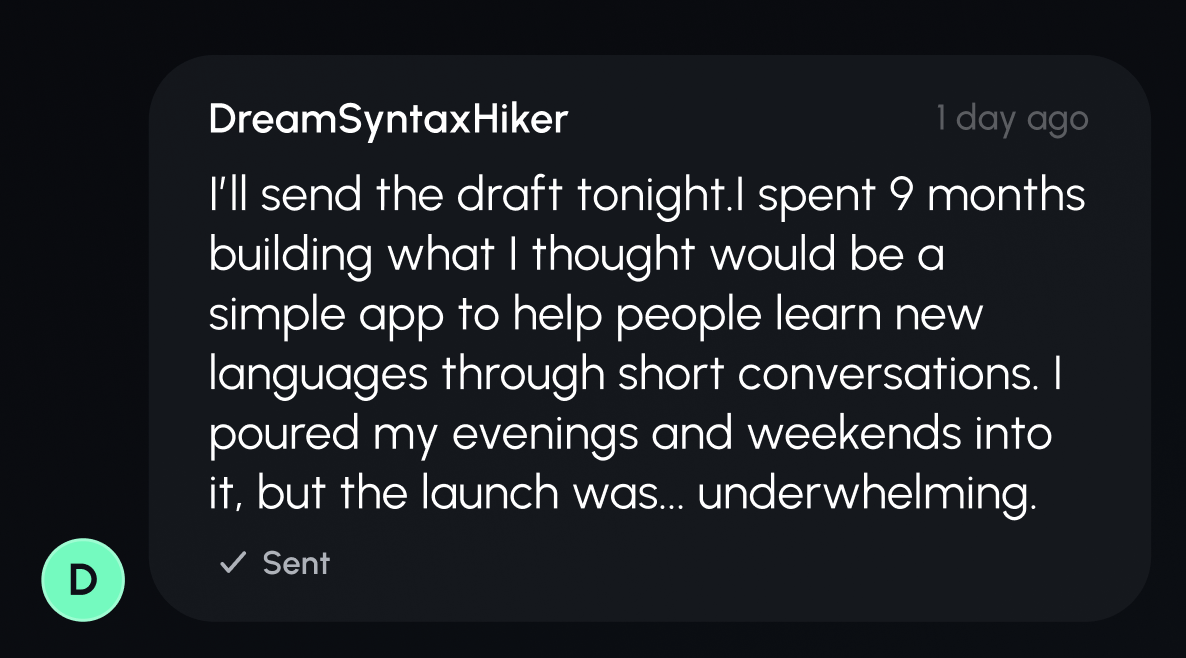
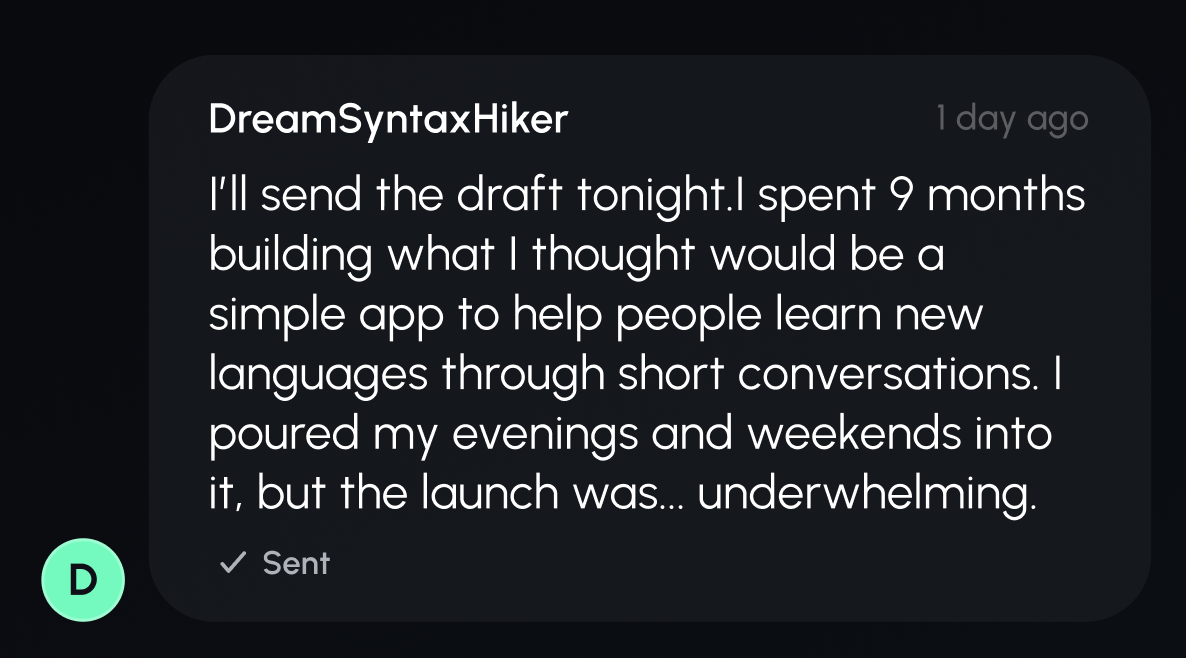
Create a message bubble that displays the sender’s name, a circular icon with their initials, a relative timestamp (e.g. “5 min ago”), and a read or delivered status indicator. Focus on polished layout and visual hierarchy — this is a static UI challenge with no interactivity.

📌 Requirements

Only a dark theme is supported.

  • Centre content

    • User profile icon with single initial

    • Message bubble composable

      • Rounded corners

      • Sender name in the top left corner

      • Relative time message sent in the top right corner. “1 day ago”

      • Message body text matching figma mockups (It is a bit too long to share here)

      • Message status below the message body text

        • Sent - check icon with “Sent”

        • Delivered - double check icon with “Delivered”

        • Read - blue double check icon with blue text “Read”

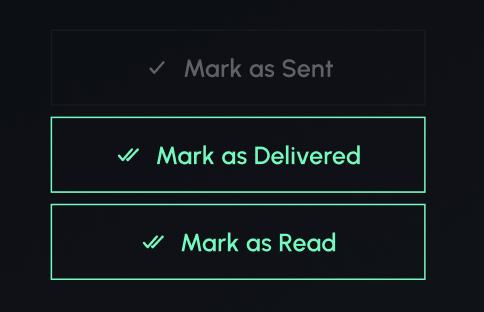
  • At the bottom of the screen are three buttons

    • Each changes the status of the message when tapped

      • “Mark as sent” button → Set message status as sent

      • “Mark as delivered” button → Set message status as delivered

      • “Mark as read” button → Set message status as read

    • Depending on the state of the message, one of the buttons will be disabled


🤔 What's Allowed?

  • Standard Android/Jetpack libraries

  • No 3rd party libraries are allowed or would be required to complete this challenge

⚠️ What's not important

  • Responsiveness across every device size or orientation is not mandatory.


🏆 Submission & Rewards

  • A successful submission of this challenge via the /submit-challenge command on Discord grants you 100 XP. You can use it in any channel on Discord :)

  • A successful submission consists of these parts

    1. A link to a Gist showing your code for this challenge.

    2. A screen recording (20s max) showcasing toggling between each of the message states by tapping each of the buttons on screen. Each button should be tapped at least once

[Gesture Handling · Animation · UI · State Management] - Emoji Composer

textpost · published

Attachments

🎭 Scenario

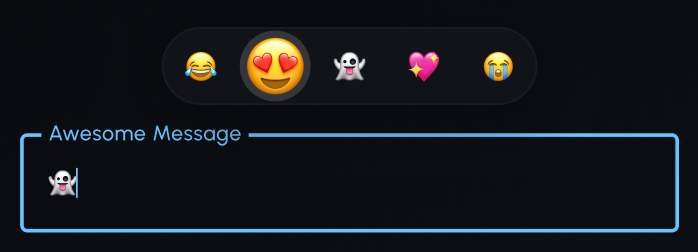
You’re building a chat app for emoji power users — people who can craft full messages with nothing but 🐸, 💅, and 🤖. They want speed and flair. Your job: add an emoji input row above the chat field where users can tap to insert emojis instantly, or press and drag to glide across emojis with a fun scaling effect before selecting the perfect one..


🎯 Feature Goal

Implement an emoji input row above the text field where users can tap emojis to insert them into the current text input. Long-pressing an emoji should trigger a zoom effect: as the user drags across the row, the emoji under their finger scales up, indicating it’s being hovered. Releasing selects and inserts the highlighted emoji. Focus on gesture handling, scaling animation, and input state updates.

📌 Requirements

Only dark theme is supported.

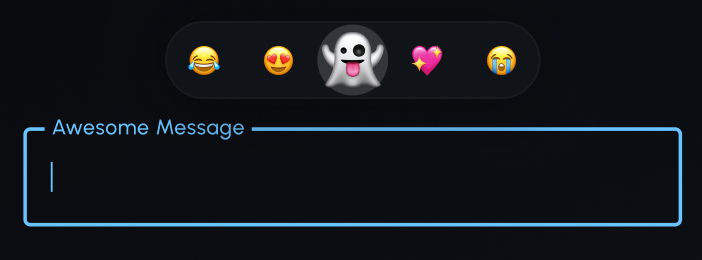
  • Outlined text input field in the center of the screen

    • Supporting text: “Awesome Message”

  • A row of emojis above the text input component

    • The row has rounded ends with a border

    • Displays a list of hardcoded emojis

    • On tap, add an emoji to the text input component at the current text input position

    • Long-pressing an emoji:

      • Triggers a zoom/scale up effect with a fade-in rounded background

      • The user is now able to drag their finger across the row of emojis (the emojis do not move, they are fixed in place)

      • Emojis only scale up (and show a rounded background) when the emoji is under the user’s finger

      • When the emoji is no longer under the user’s finger, it scales back down again and loses its rounded background

      • Only one emoji is enlarged at any time

      • Releasing the drag inserts the currently scaled emoji into the text input component


🤔 What's Allowed?

  • Standard Android/Jetpack libraries

    • Helpful APIs and modifiers

      • drawBehind, pointerInput

  • No 3rd party libraries are allowed or would be required to complete this challenge

⚠️ What's not important

  • Responsiveness across every device size or orientation is not mandatory.

🧠 Disclaimer

This challenge is all about fun animations and gesture handling, not perfection. Focus on making the scaling smooth and interactive.


🏆 Submission & Rewards

  • A successful submission of this challenge via the /submit-challenge command on Discord grants you 200 XP. You can use it in any channel on Discord :)

  • A successful submission consists of these parts

    1. A link to a Gist showing your code for this challenge.

    2. A screen recording (20s max) showcasing:

      1. Tap any emoji to add it to the text input component

      2. Tap and hold any emoji

      3. Once emoji is fully zoomed, drag finger to the next emoji

      4. Release your finger to insert the last zoomed-out emoji

[Recursion · UI · State Management] - Collapsible Chat Thread

textpost · published

Attachments

🎭 Scenario

You’re building a chat feature inspired by Reddit-style threads, where a single comment can spiral into a debate, then a side quest, then a code review. Users need a way to follow the conversation without getting buried. Your task: build a threaded UI where replies can nest infinitely, and tapping any comment neatly collapses or expands its entire branch — no scroll rage allowed.


🎯 Feature Goal

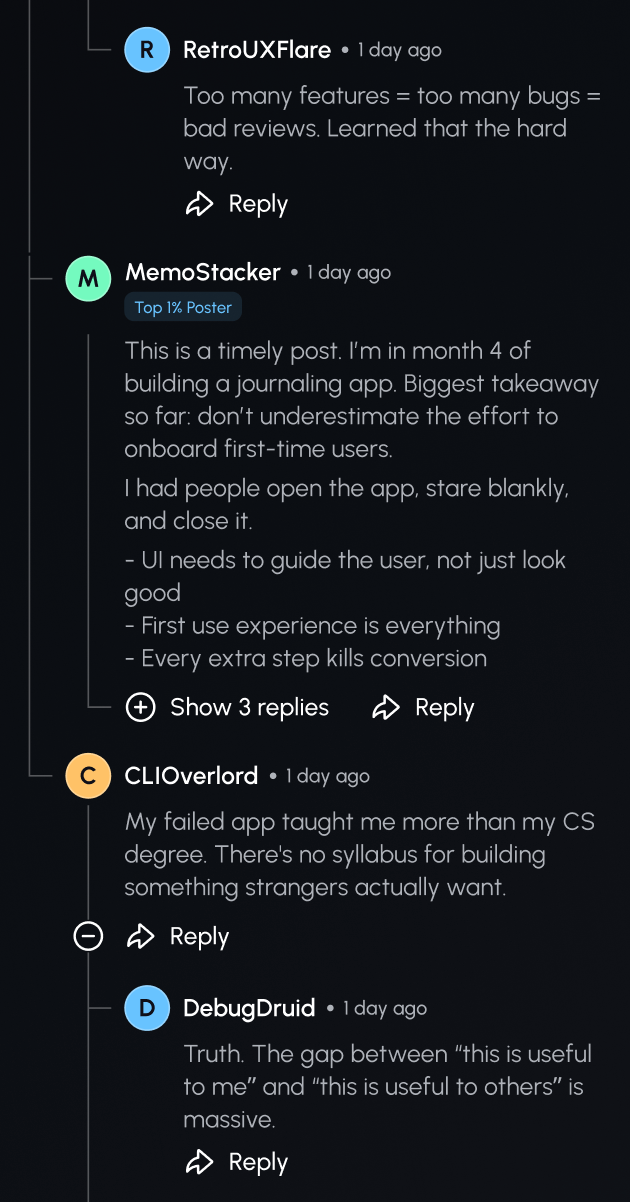
Build a threaded comment UI that supports nesting. Each comment shows the author, message, and timestamp, with a toggle to collapse or expand all nested replies beneath it. When collapsed, display a reply count for context. Focus on recursive data rendering, visual indentation, and clean state management for collapsing entire branches.

📌 Requirements

Only dark theme is supported

  • The UI consists of a series of Chat Message Components organised in a vertical arrangement, with replies appearing nested.

  • Each Chat Message Component displays**:**

    • The author's initial profile icon and author name

    • Relative date when the message was posted. Example: “1 day ago”

    • Chat channel text: “/ProductReflection”

      • This only applies to the original Chat Message Component

    • Title text

      • This only applies to the original Chat Message Component

    • Optional tags associated with the author

      • “Top 1% Commenter”

      • “Top 1% Poster”

    • The content of the message

    • Reply icon with text: “Reply”

      • This icon has no click behaviour

  • Chat threads should use vertical and horizontal connector lines to represent nesting between messages visually. These lines help indicate the structure and flow of replies in the thread. The behaviour changes based on whether a comment has replies and whether it’s expanded or collapsed.

    Reply State

    Vertical Line Below Icon

    Action Icon/Text

    Behavior

    No replies

    ❌ None

    ❌ None

    No lines or toggles shown.

    Has replies (collapsed)

    ✅ Shown

    ➕ “Show X replies”

    Display number of hidden replies. On tap, expand the full nested branch.

    Has replies (expanded)

    ✅ Shown

    ➖ Minus icon over the line

    Show all nested replies. Tap to collapse the entire reply tree recursively.


🤔 What's Allowed?

  • Standard Android/Jetpack libraries

  • No 3rd party libraries are allowed or would be required to complete this challenge

⚠️ What's not important

  • Responsiveness across every device size or orientation is not mandatory.

🧠 Disclaimer

The focal point of this challenge is the expand and collapse logic for threaded replies. Your goal is to manage recursive state cleanly and render nested threads intuitively. Don’t worry about fancy animations, over-optimization, or full feature completeness — focus on getting the core interaction right.


🏆 Submission & Rewards

  • A successful submission of this challenge via the /submit-challenge command on Discord grants you 300 XP. You can use it in any channel on Discord :)

  • A successful submission consists of these parts

    1. A link to a Gist showing your code for this challenge.

    2. A screen recording (40s max) showcasing:

      1. Start with all thread collapsed

      2. Expand each collapsed thread until they are all expanded

      3. Collapse the bottom-most thread

      4. Collapse the top-most thread