Natour
← Back to chapters

June 2025 - Birthday Celebrations

[UI · Layout] - Birthday Invite Card

textpost · published

Attachments

🎭 Scenario

You’re onboarding a new dev who swears by XML. To show them the glory of Jetpack Compose, you promise to recreate a simple birthday invite screen "without even opening a layout file." Now the pressure’s on — you need a clean layout that looks great.


🎯 Feature Goal
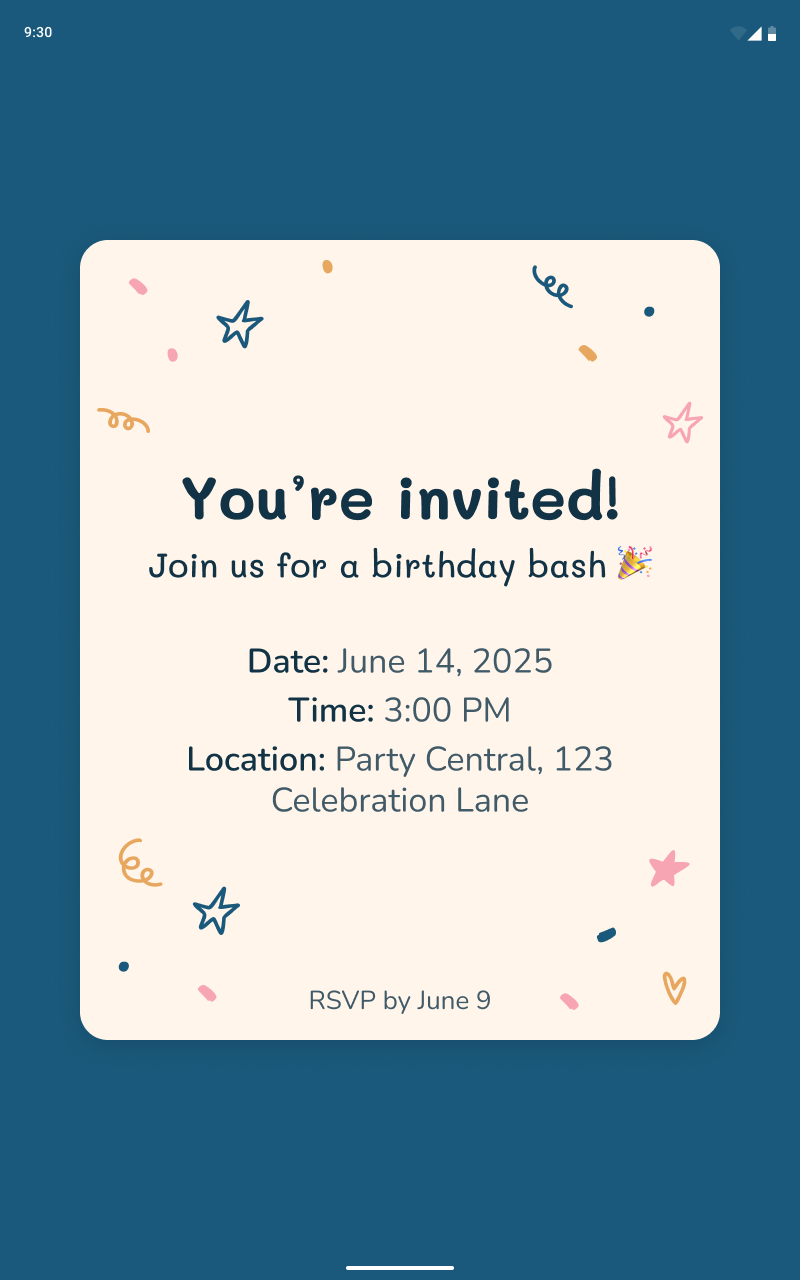
Build a static birthday invite screen using only Jetpack Compose layout elements.

📌 Requirements

  • Full screen blue background edge to edge

  • Invite card with rounded corners

    • Contains a confetti graphic

    • In center of card is title and subtitle text

    • Beneath that is text with the date, time, and location of the event

    • At the bottom of the card is the RSVP date


🤔 What's Allowed?

  • Jetpack Compose standard UI elements only

  • No 3rd party libraries are allowed or would be required to complete this challenge

  • No state, no interactivity — just static layout

⚠️ What's not important

  • Pixel-perfect font or spacing — close enough to feel polished is fine.

  • Responsiveness across every screen size — focus on phone portrait and tablet


🏆 Submission & Rewards

  • A successful submission of this challenge via the /submit-challenge command on Discord grants you 100 XP. You can use it in any channel on Discord :)

  • A successful submission consists of these parts

    1. A link to a Gist showing your code for this challenge.

    2. A screenshot of that shows both portrait and tablet layouts of your final design
[Side Effects · UI · State Management] - Cake Lighting Controller

textpost · published

Attachments

🎭 Scenario

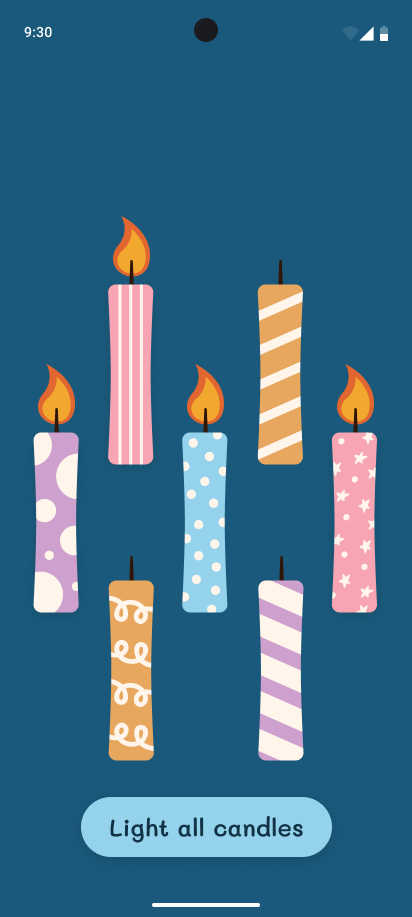
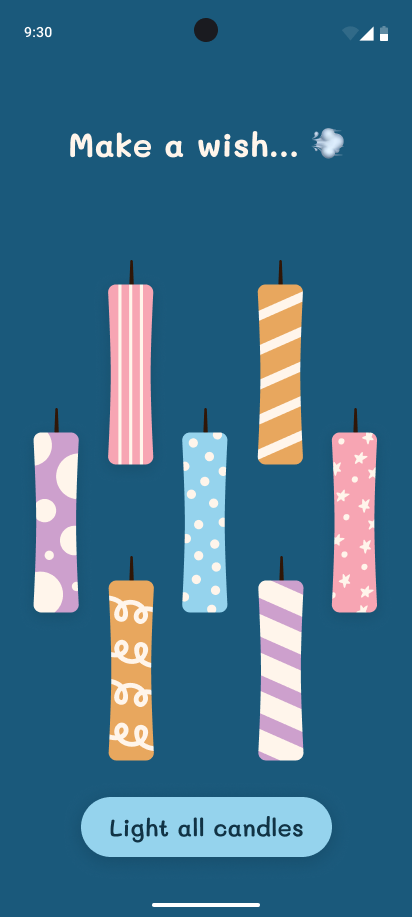
You’re building a prototype for a smart birthday cake. Yes, really. The client insists it’s the future: a cake where each candle is toggled digitally — no fire hazards, no spit. Your job? The UI. Each candle has to be individually switchable, and the app should show how many are currently "lit." It’s absurd, it’s oddly fun, and it’s your challenge now.


🎯 Feature Goal

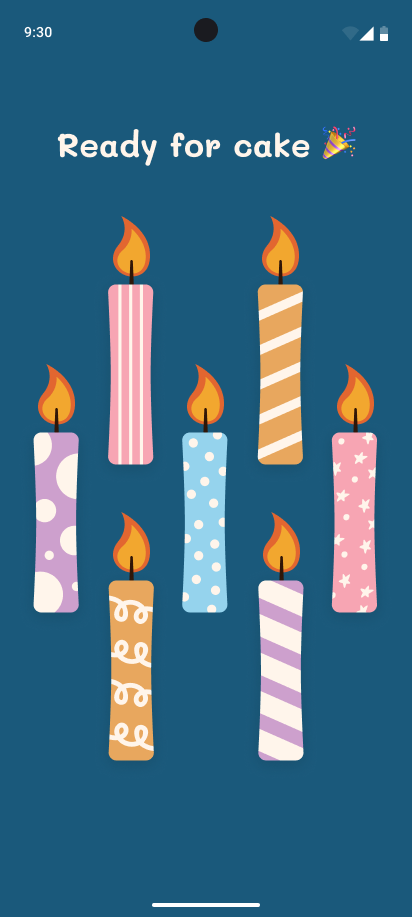
Create a candle panel where toggled-off candles automatically relight themselves after a short delay.

📌 Requirements

  • Full screen blue background

  • Title text that is only visible when all candles are lit or none are light

    • Text must use animation when visibility is toggled (the animation is up to you, but if you can’t decide, go with a basic fade animation)

    • The text is also different for when all candles are lit and when none are lit

  • Main content of the screen is full of candle graphics

    • Each has two states:

      • Lit - show flame

      • Not lit - do not show flame

    • When a lit candle is tapped, remove the flame graphic for that candle

      • When a candle’s flame is removed, start a six (6) second timer

      • When that timer is finshed, relight that candle

      • Each candle can have its own independent timer running

    • Candles can’t automatically relight (show with flame) when all of the candles have no flame

  • Bottom CTA button “Light all candles”

    • Only visible when all candles are not lit (not all candles have a flame)

    • On tap, set all candles to lit state (show all candles with flame)

    • Buttons visibility should also be done with animation


🤔 What's Allowed?

  • Standard Android/Jetpack libraries

  • No 3rd party libraries are allowed or would be required to complete this challenge

⚠️ What's not important

  • Realistic flame animations

  • Pixel-perfect spacing or alignment

  • Responsiveness across every device size or orientation is not mandatory.

🧠 Disclaimer

No need to overthink the timing or visuals — this is all about showing you can manage simple state and side effects. Just make the candles turn back on after a few seconds and have fun with the logic.


🏆 Submission & Rewards

  • A successful submission of this challenge via the /submit-challenge command on Discord grants you 100 XP. You can use it in any channel on Discord :)

  • A successful submission consists of these parts

    1. A link to a Gist showing your code for this challenge.

    2. A screen recording (30s max) showcasing:

      1. All candles lit

      2. Tap a candle and wait a second

      3. Tap another candle

      4. Wait for the first to relight

      5. Tap the remaining lit candles until all are extinguished

[Side Effects · Notifications · UI · State Management] - Countdown to Cake

textpost · published

Attachments

🎭 Scenario

You’re building a birthday countdown app for a very punctual party planner. They want users to press a button, wait a few suspenseful seconds, and then get a celebratory notification that it’s cake time. Oh — and of course, users should be able to cancel the countdown. Because sometimes, the cake isn’t ready yet.


🎯 Feature Goal

Let users start a countdown that triggers a birthday notification after a few seconds — unless they cancel it first.

📌 Requirements

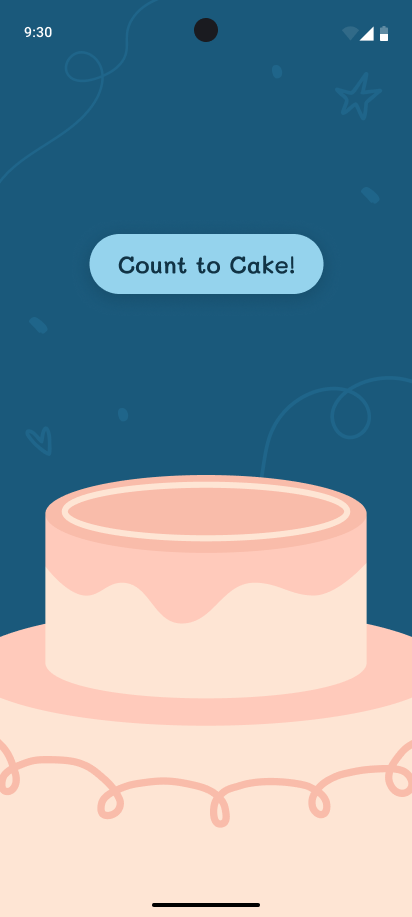
  • Fullscreen blue background edge to edge

  • Confetti graphics on background

  • Cake graphic at the bottom of the screen

  • Button near center of screen: “Count to Cake!”

    • On tap hide button and start countdown

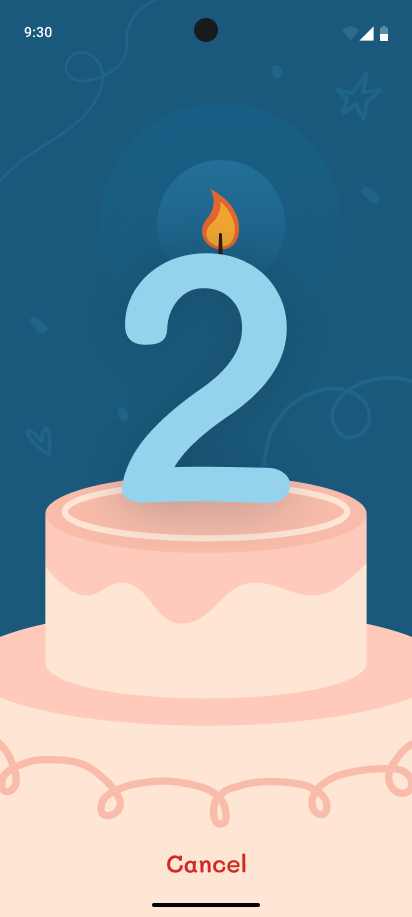
  • When countdown starts

    • Show Cancel button at the bottom center of the screen

      • On tap, reset screen state and show the “Count to Cake!” button again

    • Show a lit candle graphic just above large text placed on top of the cake

      • It remains in a fixed position and only toggles its visibility based on the screen state

    • Large countdown text starts at 5 and ends at 1

      • Each number must be on screen for roughly one (1) second

    • When the end of the countdown is reached, show a system notification with text: “🎉 It’s cake time!”


🤔 What's Allowed?

  • Standard Android/Jetpack libraries

    • Knowledge about the NotificationManger will help 👀

  • No 3rd party libraries are allowed or would be required to complete this challenge

⚠️ What's not important

  • Deep notification styling

  • Handling edge cases like background execution or device sleep

  • Perfect recreation of the mockup - it just needs to reasonably resemble the mockups

  • Responsiveness across every device size or orientation is not mandatory.

🧠 Disclaimer

This isn’t an alarm app — just a fun countdown for cake. Keep it light, keep it cancelable, and don’t worry if the UI isn’t party-planner perfect. The real goal? Show you can manage time-based actions and prevent side effects when needed.


🏆 Submission & Rewards

  • A successful submission of this challenge via the /submit-challenge command on Discord grants you 100 XP. You can use it in any channel on Discord :)

  • A successful submission consists of these parts

    1. A link to a Gist showing your code for this challenge.

    2. A screen recording (20s max) showcasing:

      1. Tap the start countdown button

      2. When it reaches 3, cancel it

      3. Start it again and wait for the notification to show

[Navigation · Responsive Layout · UI · State Management] - Party Host Dashboard

textpost · published

Attachments

🎭 Scenario

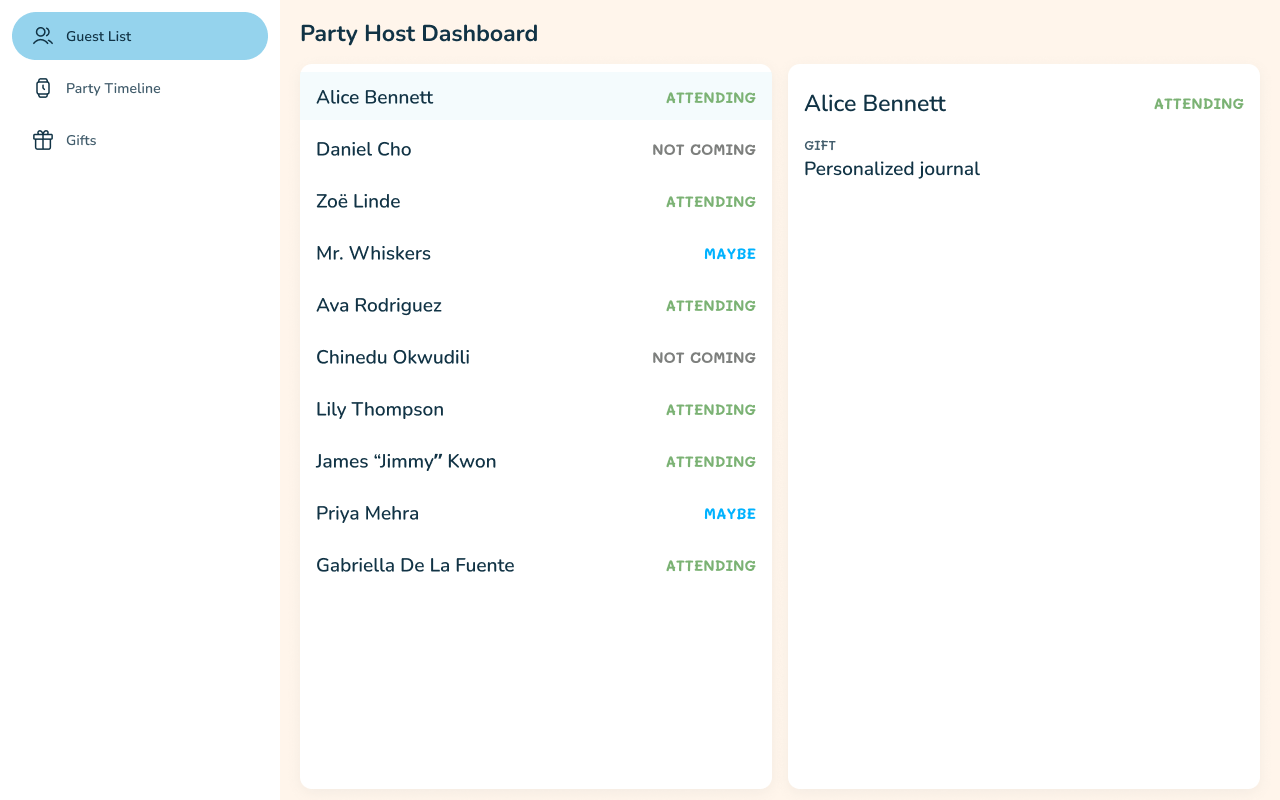
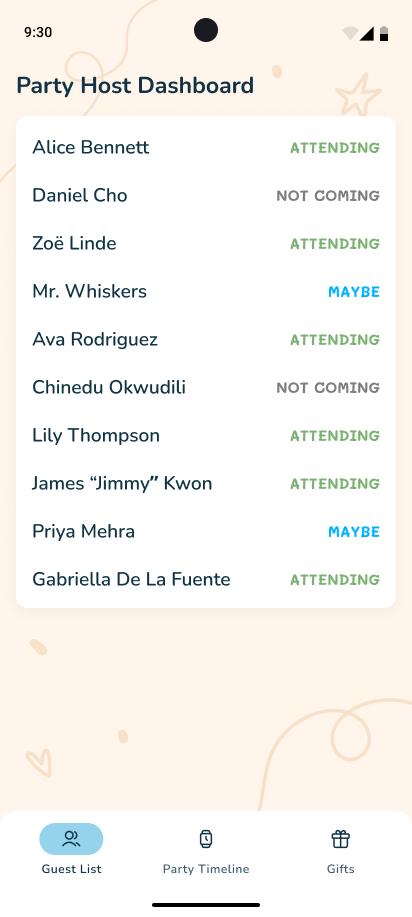
You’re building a party planning dashboard, and the client is very picky about how it looks on different devices. On phones, they want it clean and focused. On tablets? “I want to see everything at once!” they say, gesturing wildly. You sigh, open Compose, and get to work making a UI that shape-shifts like a social butterfly — drawer on phones, two-pane layout on tablets.


🎯 Feature Goal

Create a responsive party host dashboard that shows different layouts on phone vs. tablet screens.

📌 Requirements

  • Fullscreen edge to edge background with a graphic

  • The app has three primary destinations

    • Guest List

    • Party Timeline

    • Gifts

  • The primary destinations are displayed as a bottom navigation bar when the phone is in portrait mode

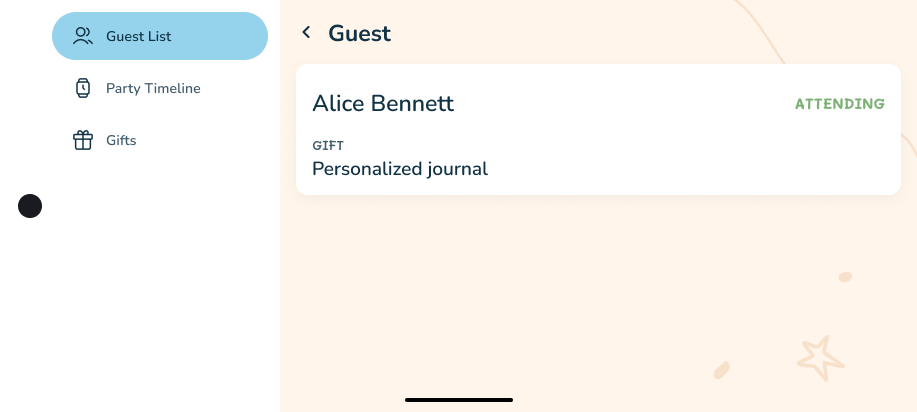
  • When the phone is in landscape mode and tablet mode, show these destinations in a side drawer located to the left of the screen.

  • Top app bar with text:

    • For all primary destinations: “Party Host Dashboard”

    • For event detail and guest detail screen, show “Event” and “Guest” with a back icon

  • In tablet mode, the detail screen are also visible alongside their primary destination screens

    • One list item in the left pane is always selected and this is indicated with a slight blue background

      • This is not possible on a phone layout

    • The right pane will show the detail screen

    • The gifts screen will cover both pane areas

  • Guest List Flow

    • List of people attending the party with their going status

    • The detail screen has a topbar title “Guest” with back arrow

      • Content includes a card with attendee’s name, going status and the gift they are bringing

  • Party Timeline Flow

    • List of timestamps with some text describing what will happen at that time

    • Event detail screen will contain the event title, date, and a short description of the details of the event

  • Gifts

    • Single screen with a scrollable list of gifts alongside the person’s name who is gifting it


🤔 What's Allowed?

  • Standard Android/Jetpack libraries

  • No 3rd party libraries are allowed or would be required to complete this challenge

⚠️ What's not important

  • Perfect recreation of the mockup - it just needs to reasonably resemble the mockups

🧠 Disclaimer

This isn’t NASA’s mission control — just a responsive UI for birthday planning. Focus on layout decisions and content visibility. If your dashboard feels intuitive on both phones and tablets, you’ve already won the party.


🏆 Submission & Rewards

  • A successful submission of this challenge via the /submit-challenge command on Discord grants you 200 XP. You can use it in any channel on Discord :)

  • A successful submission consists of these parts

    1. A link to a Gist showing your code for this challenge.

    2. A screen recording (60s max) showcasing:

      1. Two devices: Phone & tablet

      2. Perform actions on both

      3. Strat at the Guest List screen

      4. Tap on any guest to navigate to the detail screen

      5. Rotate the phone to landscape

      6. Tap the back button in the app bar

      7. Tap on the party timeline destination

      8. Tap any event

      9. Tap on the Gifts destination

      10. Rotate the phone to portrait mode

[Animation · Game Logic · UI · State Management] - Gift Memory Match

textpost · published

Attachments

🎭 Scenario

You’re helping organize a birthday party, and someone forgot to label the gifts. Now you’re stuck playing detective, trying to remember which guest brought which gift. The twist? You’ve turned it into a game for everyone else. Build a memory-matching game where guests and gifts are hidden behind cards — match them all to win the party planner’s eternal gratitude (and maybe cake).


🎯 Feature Goal

Create a flip-card memory game where players match guests to their gifts.

📌 Requirements

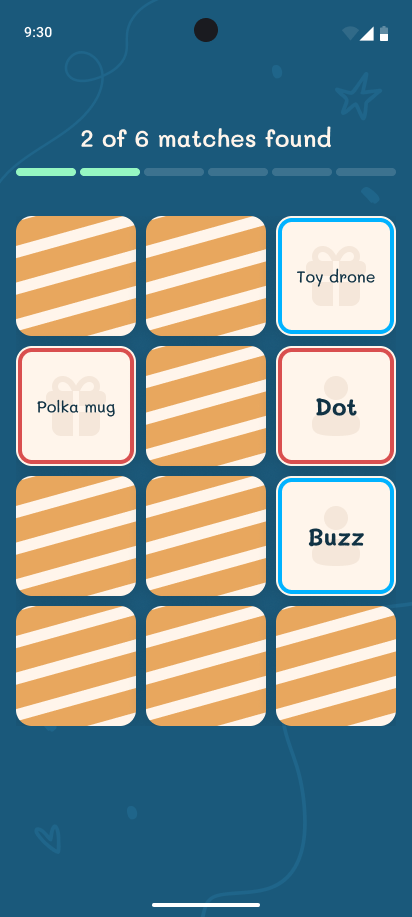
  • Fullscreen blue background

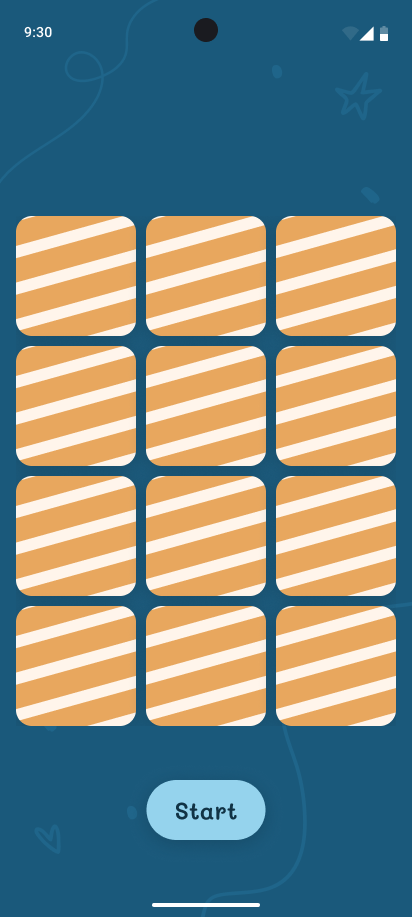
  • 3x4 grid of cards with rounded corners

    • Each card has two sides, a front and a back

    • The backs all look the same: white with orange stripes

    • The front of each card has:

      • A colored border

      • A graphic and text in the center of the card

  • CTA button “Start”

    • On tap flip all grid cards around to reveal their fronts

    • After 3 seconds, flip them all to their backs again

  • When cards flip between their fronts and backs it must be done via a basic flipping animation

  • Once the cards have flipped to their backs, the user can start interacting with the screen

    • Also show the progress bar with text above the grid when the game starts

  • Tapping any card will flip it to its front and remain there

    • A flipped card can’t be flipped to its back by the user

  • Tapping a second card will also flip it

  • If the cards are a match then they remain on their fronts and the progress bar and text updates

    • Cards with the same border color match with each other

  • If the two cards do not match, then they flip back to their backs after a short delay (2 seconds)

    • During this delay, the user can’t flip other cards

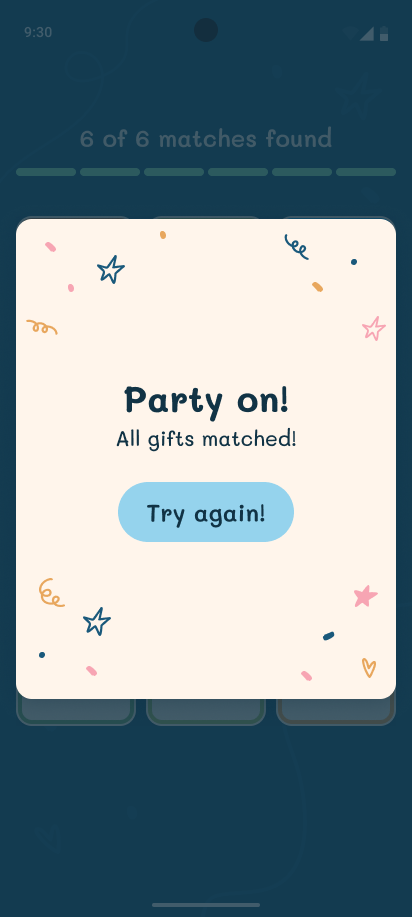
  • Once all matches have been made, show a success dialog

    • The button in the dialog resets the game

    • Dismissing the dialog also resets the game


🤔 What's Allowed?

⚠️ What's not important

  • Fancy animations — simple flip indicators are fine

  • Perfect memory game logic — just avoid bugs like double-flipping the same card

  • Perfect recreation of the mockup - it just needs to reasonably resemble the mockups

  • Responsiveness across every device size or orientation is not mandatory.

🧠 Disclaimer

Focus on your match logic and state coordination. If your cards flip, delay, and match correctly — you’re golden. If they don’t… well, guess who’s getting cleanup duty after the party? 🎁🧹


🏆 Submission & Rewards

  • A successful submission of this challenge via the /submit-challenge command on Discord grants you 300 XP. You can use it in any channel on Discord :)

  • A successful submission consists of these parts

    1. A link to a Gist showing your code for this challenge.

    2. A screen recording (90s max) showcasing you completing a round and then resetting it afterwards